Partnering
Partnering is permitted on this assignment. Before partnering, read the partnering section of the COS 226 collaboration policy. To submit the assignment while partnering with someone, make sure to create a group on TigerFile. Your group will attend the code review together, and your group should be the same as your group in the final assignment (Fraud Detection), in particular, if you do this one individually you should also do the final one individually.
Learning objectives:
- Model a problem as dynamic programming on an implicit DAG
- Apply classic algorithms to build a real-world image-processing application
Preamble
A quick reminder on the course policy. The autograder provides feedback only, it does not determine your grade. See the assignment FAQ for more details on the grading policy.
Our recommendation. Write your own code from scratch and aim to complete every requirement by the completion deadline. Treat each assignment as if the autograder score determined your grade. Working code that you understand is the sweet spot: it makes demos easy and reflects real learning. Start early to give yourself time to debug.
Seam carving
Seam carving is a content-aware image resizing technique where the image is reduced in size by one pixel of height (or width) at a time. A vertical seam in an image is a path of pixels connected from the top to the bottom with one pixel in each row; a horizontal seam is a path of pixels connected from the left to the right with one pixel in each column. Below left is the original 505-by-287 pixel image; below right is the result after removing 150 vertical seams, resulting in a 30% narrower image. Unlike standard content-agnostic resizing techniques (such as cropping and scaling), seam carving preserves the most interesting features (aspect ratio, set of objects present, etc.) of the image.
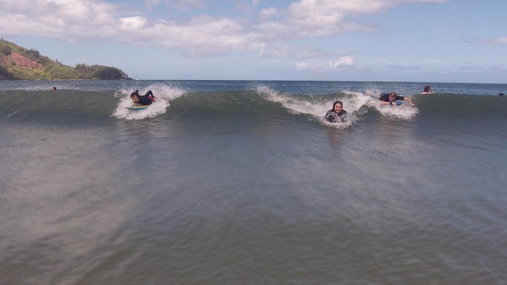
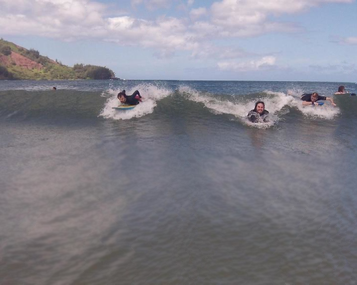
Although the underlying algorithm is simple and elegant, it was not discovered until 2007. It was a core feature in Adobe Photoshop and other computer graphics applications for a long time.
In this assignment, you will create a data type that resizes a $W$-by-$H$ image using the seam carving technique. Finding and removing a seam involves three steps and a bit of notation, described below.
Notation
In image processing, pixel $(x, y)$ refers to the pixel in column $x$ and row $y$, with pixel $(0, 0)$ at the upper-left corner and pixel $(W - 1, H - 1)$ at the lower-right corner. This is consistent with the Picture data type in algs4.jar.
| (0, 0) | (1, 0) | (2, 0) |
| (0, 1) | (1, 1) | (2, 1) |
| (0, 2) | (1, 2) | (2, 2) |
| (0, 3) | (1, 3) | (2, 3) |
Warning: this is the opposite of the standard mathematical convention used in linear algebra, where $(i, j)$ refers to row $i$ and column $j$ and $(0, 0)$ is at the lower-left corner.
We also assume that the color of each pixel is represented in RGB space, using three integers between 0 and 255. This is consistent with the java.awt.Color data type. For examples of how to read and modify pixel colors using Picture and Color, see Luminance.java and Grayscale.java from COS 126.
Energy calculation
The first step is to calculate the energy of a pixel, which is a measure of its importance — the higher the energy, the less likely that the pixel will be included as part of a seam. We use the dual-gradient energy function: the energy of pixel $(x, y)$ is
$$\text{energy}(x, y) = \sqrt{\Delta_x^2(x, y) + \Delta_y^2(x, y)}$$
where the square of the x-gradient is $\Delta_x^2(x, y) = R_x(x,y)^2 + G_x(x,y)^2 + B_x(x,y)^2$, and $R_x(x,y)$, $G_x(x,y)$, $B_x(x,y)$ are the differences in the red, green, and blue components between pixel $(x + 1, y)$ and pixel $(x - 1, y)$, respectively. The square of the y-gradient $\Delta_y^2(x, y)$ is defined analogously using pixels $(x, y + 1)$ and $(x, y - 1)$.
To handle pixels on the border of the image, treat the leftmost and rightmost columns as adjacent, and the topmost and bottommost rows as adjacent. For example, to compute the energy of a pixel $(0, y)$ in the leftmost column, use its right neighbor $(1, y)$ and its "left" neighbor $(W - 1, y)$.
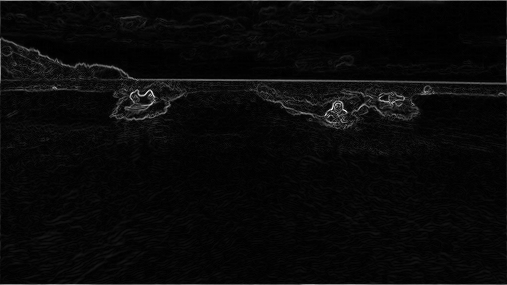
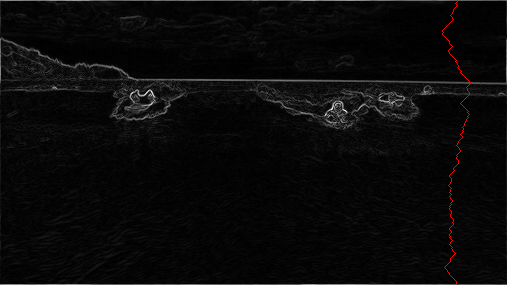
Here is the dual-gradient energy function of the surfing image above: high-energy pixels (white) correspond to regions with rapid color changes, such as the boundary between the sea and sky. The seam-carving technique avoids removing such high-energy pixels.
As a concrete example, consider the following 3-by-4 image (3x4.png):

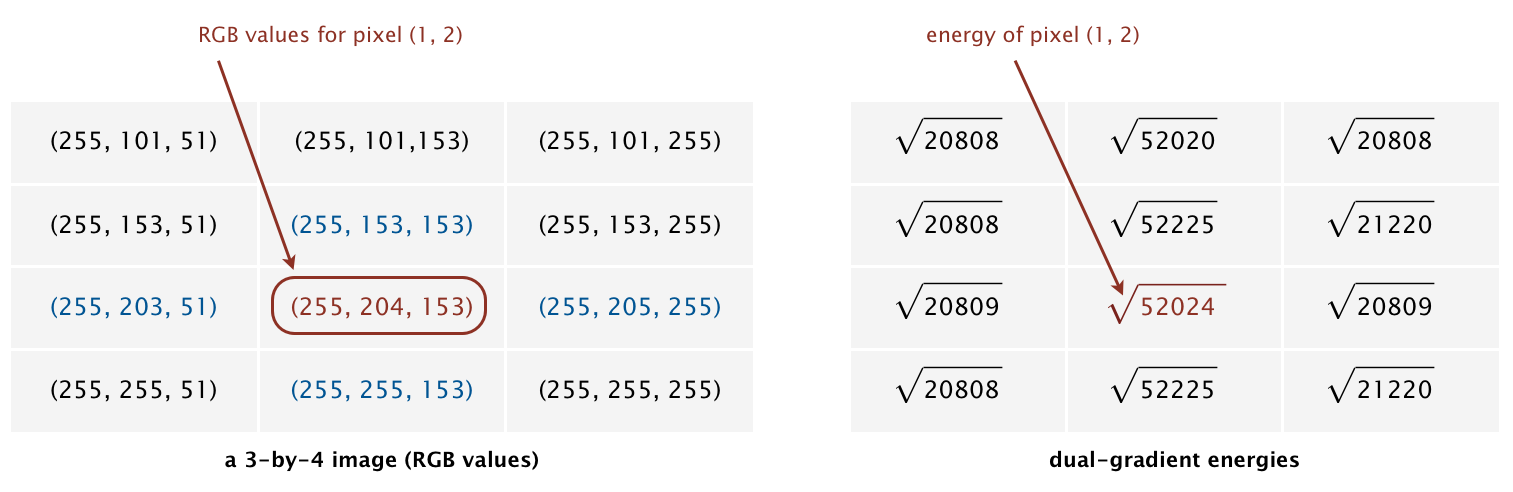
The energy of the non-border pixel $(1, 2)$ uses pixels $(0, 2)$ and $(2, 2)$ for the x-gradient:
$$R_x(1,2) = 255 - 255 = 0$$ $$G_x(1,2) = 205 - 203 = 2$$ $$B_x(1,2) = 255 - 51 = 204$$
$$\Delta_x^2(1,2) = 0^2 + 2^2 + 204^2 = 41620$$
and pixels $(1, 1)$ and $(1, 3)$ for the y-gradient:
$$R_y(1,2) = 255 - 255 = 0$$ $$G_y(1,2) = 255 - 153 = 102$$ $$B_y(1,2) = 153 - 153 = 0$$
$$\Delta_y^2(1,2) = 102^2 = 10404$$
Thus, $\text{energy}(1,2) = \sqrt{41620 + 10404} = \sqrt{52024}$.
The energy of the border pixel $(1, 0)$ uses pixels $(0, 0)$ and $(2, 0)$ for the x-gradient and the adjacent rows $(1, 3)$ and $(1, 1)$ for the y-gradient (wrapping around), yielding $\text{energy}(1,0) = \sqrt{41616 + 10404} = \sqrt{52020}$.
Seam identification
The next step is to find a vertical seam of minimum total energy. (Finding a horizontal seam is analogous.) This is similar to the classic shortest path problem in an edge-weighted digraph, but with three important differences:
- The weights are on the vertices, not the edges.
- The goal is to find the shortest path from any of the $W$ pixels in the top row to any of the $W$ pixels in the bottom row.
- The digraph is acyclic: there is a downward edge from pixel $(x, y)$ to pixels $(x - 1, y + 1)$, $(x, y + 1)$, and $(x + 1, y + 1)$, for valid coordinates.
Seams cannot wrap around the image (e.g., a vertical seam cannot cross from the leftmost column of the image to the rightmost column). While treating the image as a torus when computing seams would be consistent with the energy function's wrap-around convention, it often produces undesirable visual artifacts.
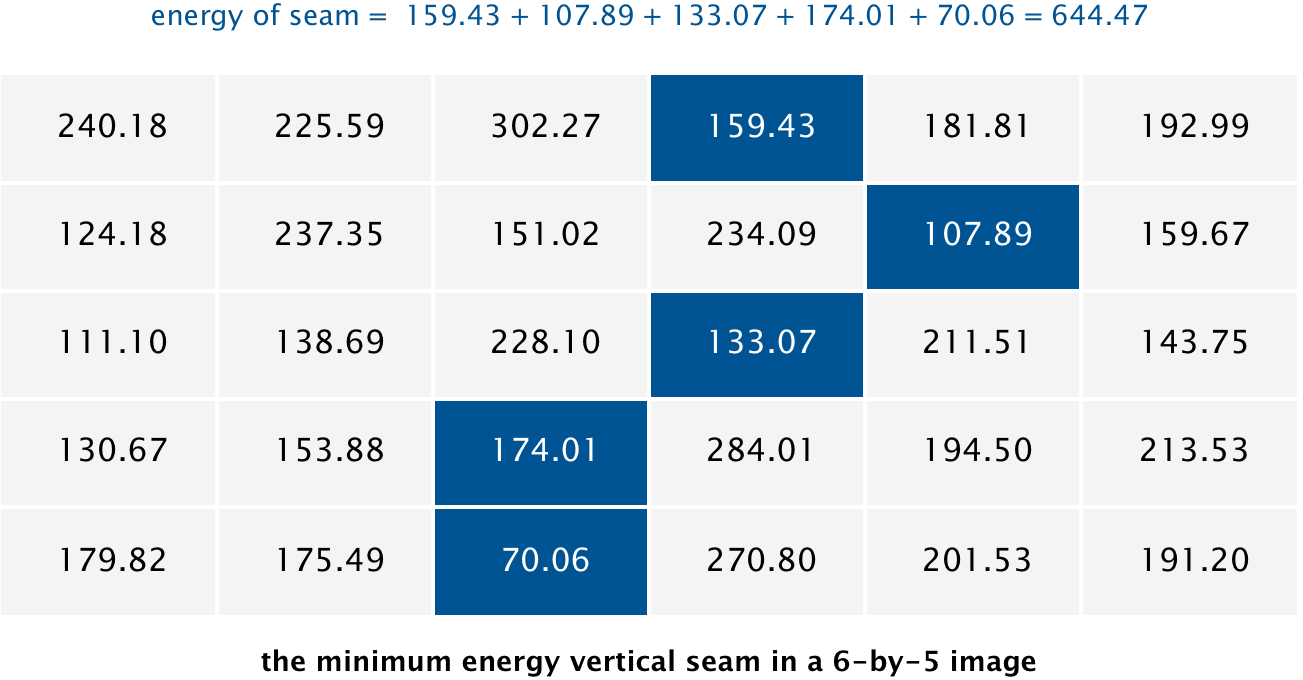
For the 6-by-5 image (6x5.png), the minimum-energy vertical seam (highlighted in blue) passes through columns ${3, 4, 3, 2, 2}$ — findVerticalSeam() returns { 3, 4, 3, 2, 2 }:

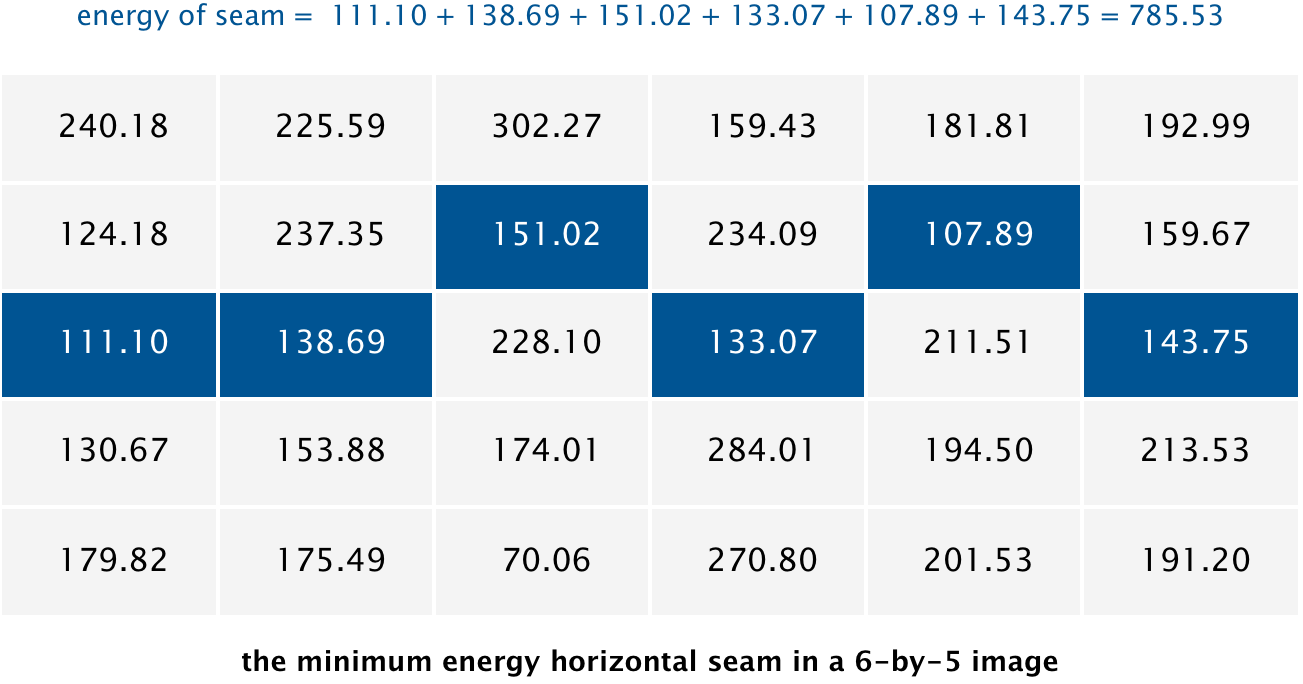
The minimum-energy horizontal seam passes through rows ${2, 2, 1, 2, 1, 2}$ — findHorizontalSeam() returns { 2, 2, 1, 2, 1, 2 }:
When there are multiple seams with the same minimum total energy, you may return any one of them.
Seam removal
The final step is to remove from the image all of the pixels along the seam.
The SeamCarver data type
Implement a mutable data type SeamCarver with the following API:
public class SeamCarver {

    // create a seam carver object based on the given picture
    public SeamCarver(Picture picture)

    // current picture
    public Picture picture()

    // width of current picture
    public int width()

    // height of current picture
    public int height()

    // energy of pixel at column x and row y
    public double energy(int x, int y)

    // sequence of indices for horizontal seam
    public int[] findHorizontalSeam()

    // sequence of indices for vertical seam
    public int[] findVerticalSeam()

    // remove horizontal seam from current picture
    public void removeHorizontalSeam(int[] seam)

    // remove vertical seam from current picture
    public void removeVerticalSeam(int[] seam)

    // unit testing (optional)
    public static void main(String[] args)

}
SeamCarver Requirements
SeamCarver(Picture picture)
- Behavior: Construct a seam carver object based on the given picture.
- Corner case: Throw
IllegalArgumentExceptionif the argument isnull. - Constraint: Do not mutate the
Pictureargument.
picture()
- Behavior: Return the current picture.
- Constraint: The returned
Picturemust be independent of theSeamCarver's internal state; if the client modifies it, theSeamCarvershould not be affected. - Performance: Proportional to $W \cdot H$ in the worst case.
width()
- Behavior: Return the width of the current picture.
- Performance: Constant time.
height()
- Behavior: Return the height of the current picture.
- Performance: Constant time.
energy(int x, int y)
- Behavior: Return the energy of pixel at column
xand rowy, using the dual-gradient energy function described above. - Corner case: Throw
IllegalArgumentExceptionifxoryis outside its prescribed range. - Performance: Constant time.
findVerticalSeam()
- Behavior: Return a minimum-energy vertical seam as an array of length $H$, where entry $y$ is the column of the pixel to remove from row $y$.
- Performance: Proportional to $W \cdot H$ in the worst case.
findHorizontalSeam()
- Behavior: Return a minimum-energy horizontal seam as an array of length $W$, where entry $x$ is the row of the pixel to remove from column $x$.
- Performance: Proportional to $W \cdot H$ in the worst case.
removeVerticalSeam(int[] seam)
- Behavior: Remove the given vertical seam from the current picture. The seam does not need to be a minimum-energy seam; the method must work for any valid seam.
- Corner case: Throw
IllegalArgumentExceptionif the argument isnull, the array has the wrong length, the array is not a valid seam (any entry is outside its column range, or two adjacent entries differ by more than 1), or the current picture has width 1. - Performance: Proportional to $W \cdot H$ in the worst case.
removeHorizontalSeam(int[] seam)
- Behavior: Remove the given horizontal seam from the current picture. The seam does not need to be a minimum-energy seam; the method must work for any valid seam.
- Corner case: Throw
IllegalArgumentExceptionif the argument isnull, the array has the wrong length, the array is not a valid seam (any entry is outside its row range, or two adjacent entries differ by more than 1), or the current picture has height 1. - Performance: Proportional to $W \cdot H$ in the worst case.
Additional guidance
Guard against external mutation of Picture objects: make a defensive copy of the Picture passed to the constructor so that later changes to it do not affect the SeamCarver, and return a defensive copy from picture() so that the client cannot modify internal state through the returned reference.
For performance, do not construct an explicit EdgeWeightedDigraph; instead, execute the shortest-paths algorithm directly on the pixel grid. This is substantially faster and uses substantially less memory. When finding a seam, call energy() at most once per pixel — save energies in a local energy[][] array rather than recomputing them. Also avoid redundant calls to get() in Picture: to read the red, green, and blue components of a pixel, call get() only once. Due to caching effects, the order in which you traverse pixels (row-major vs. column-major) can make a meaningful difference.
A Picture object uses approximately $4WH$ bytes of memory. Unless you are optimizing to update only the energy values that change after removing a seam, you should not store energy values in instance variables. Similarly, distTo[][] and edgeTo[][] arrays should be local variables, not instance variables.
Testing tips
The project files include the following test clients:
| Client | Description |
|---|---|
PrintEnergy.java |
Prints a table of energy values for a given image. |
ShowEnergy.java |
Draws the energy function of a given image. |
ShowSeams.java |
Draws the horizontal and vertical seams overlaid on the energy. |
PrintSeams.java |
Prints energies with brackets around the seam pixels; compare against the provided .printseams.txt reference files (e.g., 5x6.printseams.txt). |
ResizeDemo.java |
Resizes an image by removing $r$ columns and $s$ rows (command-line arguments). Best used with real images, not small test files. |
SCUtility.java |
Utility used by the above clients; also provides SCUtility.randomPicture() to generate random test images. |
Your code should work correctly regardless of how many times each method is called and in what order. A good test is to find and remove a seam, then verify that finding and removing another seam still produces correct results — try all combinations of horizontal and vertical seams.
Deliverables
Project files
The file seam.zip contains sample data files and test clients. It also contains feedback.txt, which you should fill out, and acknowledgments.txt, which you should complete with citations and collaboration information.
Submission
Submit SeamCarver.java. Do not call any library functions other than those in
java.lang,
java.util,
java.awt.Color,
and algs4.jar.
Finally, submit feedback.txt and acknowledgments.txt and answer the questions.
| File | Purpose |
|---|---|
SeamCarver.java |
Mutable data type for content-aware image resizing. |
feedback.txt |
Answers the assignment feedback questions. |
acknowledgments.txt |
Lists collaborators and external resources used. |
Advice and Further Challenges
Suggested Approach
To help you work through the assignment, here is a suggested list of steps for how you might make progress. You don't have to follow this list to complete the assignment and in fact we recommend you don't look at it unless you get stuck.
List of steps.
-
Download the project files. Download
seam.zip. It contains sample input images and test clients. -
Implement the constructor and simple methods. Write
SeamCarver(Picture picture),picture(),width(), andheight(). Think carefully about which instance variables you will need to support the other methods — once you have settled on a representation, these should be straightforward. -
Implement
energy(). Computing $\Delta_x^2$ and $\Delta_y^2$ are very similar; consider a private helper method to avoid duplication. Test withPrintEnergy.java. -
Implement
findVerticalSeam(). Before writing code, think carefully about which shortest-paths algorithm to use and why it satisfies the performance requirements. Represent the pixel DAG implicitly as a $W$-by-$H$ energy matrix rather than constructing an explicitEdgeWeightedDigraph— the resulting code will be substantially faster and use much less memory. Think about which data structures (e.g.,distTo[][]andedgeTo[][]) you need, and make them local variables. Test withPrintSeams.java. -
Implement
removeVerticalSeam(). Make sure it works for any valid seam, not just minimum-energy seams. Test withResizeDemo.java. -
Implement
findHorizontalSeam()andremoveHorizontalSeam(). Rather than duplicating logic, transpose the picture, callfindVerticalSeam()orremoveVerticalSeam(), then transpose back. Transposing a picture means interchanging its row and column indices — for example, the pixel at column $x$, row $y$ in the original becomes column $y$, row $x$ in the transpose. Don't forget to transpose back after the call.
Leaderboard
The leaderboard is an optional, ungraded challenge where you can compare the performance of your SeamCarver implementation against other students. Submit your solution to the separate leaderboard TigerFile instance for a friendly competition — you choose a nickname when submitting, so your identity can remain anonymous.
To improve your rank, use getARGB() instead of get() in Picture to avoid allocating Color objects on every pixel access. The companion setARGB() method sets pixel color using the same 32-bit encoding.