
Standard Libraries
Standard libraries.
Below is a table of the input and output libraries that we use throughout the textbook and beyond.
Using the standard libraries.
The file stdlib.jar bundles together all of our standard libraries into one file. To access the libraries, you must addstdlib.jar
to your Java classpath.
There are many ways to do so (and many opportunities to make mistakes).
Here are the two recommended ways:
- Use the javac-introcs and java-introcs commands.
If you followed our installation instructions for
Mac OS X,
Windows, or
Linux,
the commands
javac-introcsandjava-introcsare available from the command line (with OS X or Linux) or Git Bash (with Windows).% javac-introcs MyProgram.java % java-introcs MyProgram
- Use our IntelliJ project folders.
If you use IntelliJ, the project folders we supply are preconfigured to include
stdlib.jarin the classpath.
- Use the -classpath command-line option.
Put stdlib.jar in the same directory as
the program you are writing (but do not unjar it).
Then, compile and execute as follows:
The -classpath option tells Java which directories to search for for .java and .class files The . refers to the current directory (which contains MyProgram.java and MyProgram.class). The stdlib.jar refers to theOS X / Linux / Git Bash ----------------------- % javac -classpath .:stdlib.jar MyProgram.java % java -classpath .:stdlib.jar MyProgram Windows Commmand Prompt ----------------------- % javac -classpath .;stdlib.jar MyProgram.java % java -classpath .;stdlib.jar MyProgram
jarfile containing our standard libraries. On OS X, the : separates directories in the classpath; on Windows the ; separates directories. - Current directory.
Perhaps the simplest (but definitely not the sanest) way to use the standard libraries
to download stdlib.jar and unjar it
in your current working directory.
Alternatively, you can download the individual .java files you need (such as StdIn.java) and put them in the same directory as the program you are writing. Then, compile and execute as usual.% jar xf stdlib.jar
This approach has the drawback that you need a copy of each .java file you need in each directory where you need it.% javac MyProgram.java % java MyProgram
- Use the CLASSPATH environment variable. You can set your system CLASSPATH environment variable to contain stdlib.jar. We do not recommend this approach because the CLASSPATH variable may be used by other applications.
- Configure your IDE.
You can configure your IDE to include stdlib.jar in the classpath.
- IntelliJ: select File → Project Structure → Libraries.
- Eclipse: select Project → Properties → Java Build Path → Libaries → Add External JARs.
- DrJava: select Preferences → Extra Classpath → Add.
- Windows Command Prompt: select Start → Computer → System Properties → Advanced → Environment Variables → User Variables → CLASSPATH.
Standard input and standard output.
StdIn.java and StdOut.java are libraries for reading in numbers and text from standard input and printing out numbers and text to standard output. Our versions have a simpler interface than the corresponding Java ones (and provide a few tecnical improvements). Average.java reads in a sequence of real numbers from standard input and prints their average on standard output.In.java and Out.java are object-oriented versions that support multiple input and output streams, including reading from a file or URL and writing to a file. Wget.java reads in data from the URL specified on the command line and save it in a file with the same name.
Binary standard input and standard output.
BinaryStdIn.java and BinaryStdOut.java are the analogs for binary data. Copy.java reads a binary file from standard input and writes it to standard output.
Standard drawing.
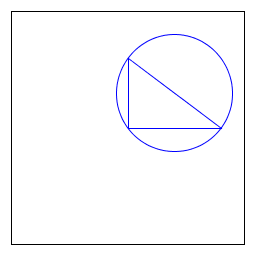
StdDraw.java is an easy-to-use library for drawing geometric shapes, such as points, lines, and circles. RightTriangle.java draws a right triangle and a circumscribing circle.
% java RightTriangle
BouncingBall.java illustrates how to produce an animation using standard drawing.
Draw.java is an object-oriented versions that support drawing in multiple windows.
Standard audio.
StdAudio.java is an easy-to-use library for synthesizing sound. Tone.java reads in a frequency and duration from the command line, and it sonifies a sine wave of the given frequency for the given duration.
Image processing.
Picture.java is an easy-to-use library for image processing. Scale.java takes the name of a picture file and two integers (width w and height h) as command-line arguments and scales the image to w-by-h.
% java Scale mandrill.jpg 298 298 
% java Scale mandrill.jpg 200 200 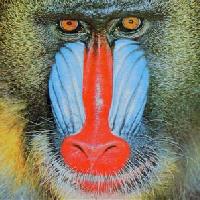
% java Scale mandrill.jpg 200 400 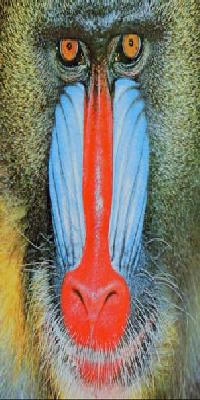
Q + A
Q. Can I use your code in my project?
A. Our library stdlib.jar is released under the GNU General Public License, version 3 (GPLv3). If you wish to license the code under different terms, please contact us to discuss.
Q. If I use a named package to structure my code, the compiler can no longer access the libraries in stdlib.jar. Why not?
A. The libraries in stdlib.jar are in the "default" package. In Java, you can't access classes in the default package from a named package. If you need to use our libraries with a named package, you can use algs4.jar.
Warning: if you are taking our Princeton or Coursera course, you must use
stdlib.jarto facilitate grading.