Class Picture
- Object
-
- Picture
-
- All Implemented Interfaces:
ActionListener,EventListener
public final class Picture
extends Object
implements ActionListener
ThePicturedata type provides a basic capability for manipulating the individual pixels of an image. You can either create a blank image (of a given dimension) or read an image in a supported file format (typically JPEG, PNG, GIF, TIFF, and BMP). This class also includes methods for displaying the image in a window and saving it to a file.Use in the curriculum. The
Pictureclass is intended for use in the curriculum once objects are introduced. TheStdPictureclass is intended for earlier use in the curriculum, before objects (but it can support only one picture at a time). SeeGrayscalePicturefor a version that supports grayscale images.Getting started. To use this class, you must have
Picturein your Java classpath. Here are three possible ways to do this:- If you ran our autoinstaller, use the commands
javac-introcsandjava-introcs(orjavac-algs4andjava-algs4) when compiling and executing. These commands addstdlib.jar(oralgs4.jar) to the Java classpath, which provides access toPicture. - Download stdlib.jar (or algs4.jar) and add it to the Java classpath.
- Download StdPicture.java and Picture.java and put them in the working directory.
As a test, cut-and-paste the following short program into your editor:
   public class TestPicture {
       public static void main(String[] args) {
           Picture picture = new Picture("https://introcs.cs.princeton.edu/java/stdlib/mandrill.jpg");
           picture.show();
       }
   }
If you compile and execute the program, you should see a picture of a mandrill (a colorful monkey native to west-central Africa) in a window.
Anatomy of an image. An image is a width-by-height grid of pixels, with pixel (0, 0) in the upper-left corner. Each pixel has a color that is represented using the RGB color model, which specifies the levels of red (R), green (G), and blue (B) on an integer scale from 0 to 255.
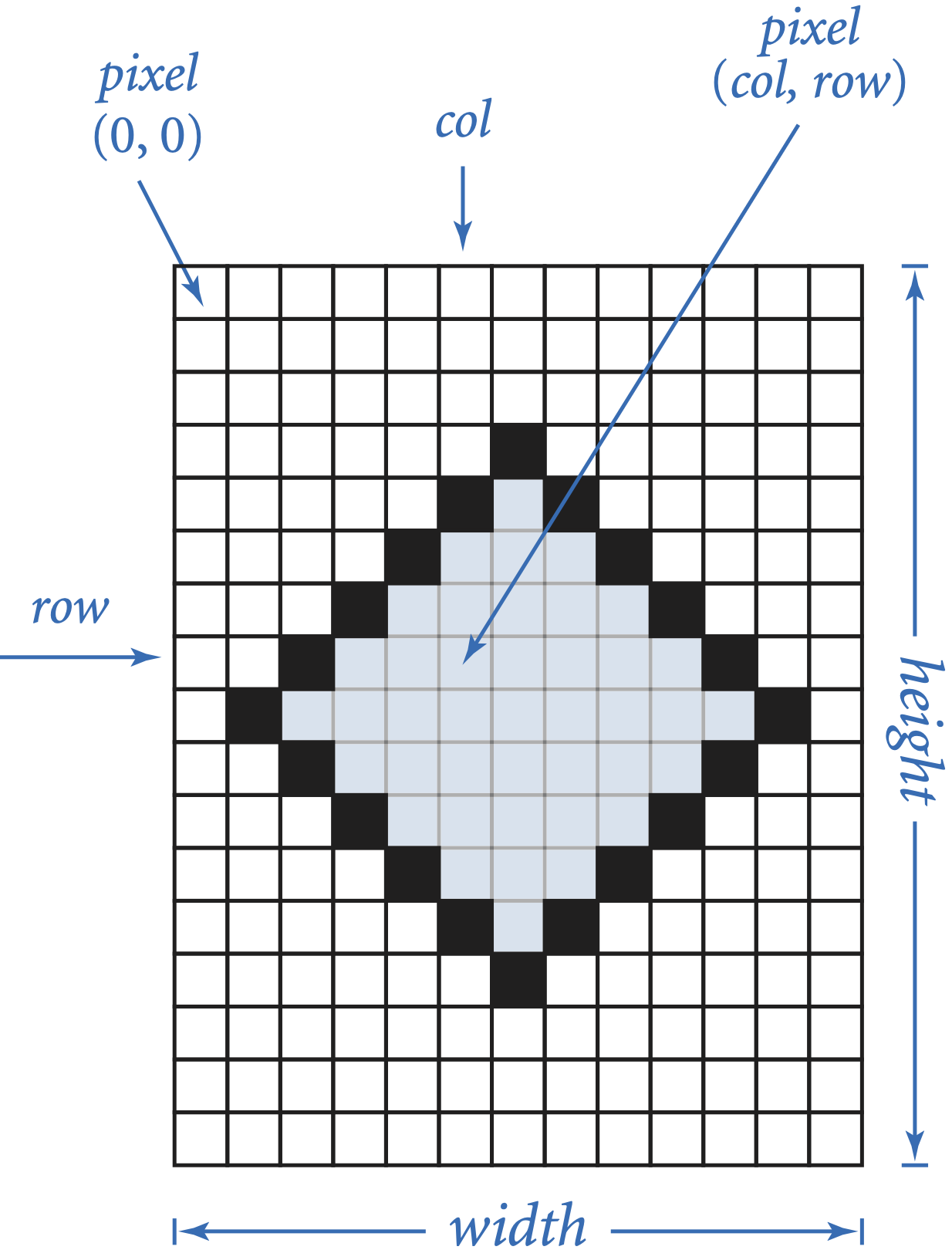
Creating pictures. You can use the following constructors to create new
Pictureobjects:The first constructor read an image in a supported file format (typically JPEG, PNG, GIF, TIFF, and BMP) and initializes the picture to that image. The second constructor creates a width-by-height picture, with each pixel black.
Getting and setting the colors of the individual pixels. You can use the following methods to get and set the color of a specified pixel:
The first method returns the color of pixel (col, row) as a
Colorobject. The second method sets the color of pixel (col, row) to the specified color.Iterating over the pixels. A common operation in image processing is to iterate over and process all of the pixels in an image. Here is a prototypical example that creates a grayscale version of a color image, using the NTSC formula Y = 0.299r + 0.587g + 0.114b. Note that if the red, green, and blue components of an RGB color are all equal, the color is a shade of gray.
  Picture picture   = new Picture("https://introcs.cs.princeton.edu/java/stdlib/mandrill.jpg");
  Picture grayscale = new Picture(picture.width(), picture.height());
  for (int col = 0; col < picture.width(); col++) {
      for (int row = 0; row < picture.height(); row++) {
          Color color = picture.get(col, row);
          int r = color.getRed();
          int g = color.getGreen();
          int b = color.getBlue();
          int y = (int) (Math.round(0.299*r + 0.587*g + 0.114*b));
          Color gray = new Color(y, y, y);
          grayscale.set(col, row, gray);
      }
  }
  picture.show();
  grayscale.show();
Transparency. Both the
ColorandPictureclasses support transparency, using the alpha channel. The alpha value defines the transparency of a color, with 0 corresponding to completely transparent and 255 to completely opaque. If transparency is not explicitly used, the alpha values is 255.32-bit color. Sometimes it is more convenient (or efficient) to manipulate the color of a pixel as a single 32-bit integers instead of four 8-bit components. The following methods support this:
The red (R), green (G), and blue (B) components are encoded using the least significant 24 bits. Given a 32-bit
intencoding the color, the following code extracts the ARGB components:
Given the ARGB components (8-bits each) of a color, the following statement packs it into a 32-bitint a = (rgb >> 24) & 0xFF; int r = (rgb >> 16) & 0xFF; int g = (rgb >> 8) & 0xFF; int b = (rgb >> 0) & 0xFF;
int:int argb = (a << 24) | (r << 16) | (g << 8) | (b << 0);
Coordinates. Pixel (col, row) is column col and row row. By default, the origin (0, 0) is the pixel in the upper-left corner. These are common conventions in image processing and consistent with Java's
BufferedImagedata type. The following two methods allow you to change this convention:Saving files. The
Pictureclass supports writing images to a supported file format (typically JPEG, PNG, GIF, TIFF, and BMP). You can save the picture to a file using these two methods:Alternatively, you can save the picture interactively by using the menu option File → Save from the picture window.
File formats. The
Pictureclass supports reading and writing images to any of the file formats supported byjavax.imageio(typically JPEG, PNG, GIF, TIFF, and BMP). The file extensions corresponding to JPEG, PNG, GIF, TIFF, and BMP, are.jpg,.png,.gif,.tif, and.bmp, respectively. The file formats JPEG and BMP do not support transparency.Memory usage. A W-by-H picture uses ~ 4 W H bytes of memory, since the color of each pixel is encoded as a 32-bit
int.Additional documentation. For additional documentation, see Section 3.1 of Computer Science: An Interdisciplinary Approach by Robert Sedgewick and Kevin Wayne.
- Author:
- Robert Sedgewick, Kevin Wayne
-
-
Constructor Summary
Constructors Constructor Description Picture(int width, int height)Creates awidth-by-heightpicture, withwidthcolumns andheightrows, where each pixel is black.Picture(File file)Creates a picture by reading the image from a JPEG, PNG, GIF, BMP, or TIFF file.Picture(String filename)Creates a picture by reading a JPEG, PNG, GIF , BMP, or TIFF image from a file or URL.Picture(Picture picture)Creates a new picture that is a deep copy of the argument picture.
-
Method Summary
All Methods Static Methods Instance Methods Concrete Methods Modifier and Type Method Description voidactionPerformed(ActionEvent e)Opens a save dialog box when the user selects "Save As" from the menu.booleanequals(Object other)Returns true if this picture is equal to the argument picture.Colorget(int col, int row)JLabelgetJLabel()intgetRGB(int col, int row)Returns the color of pixel (col,row) as anint.inthashCode()This operation is not supported because pictures are mutable.intheight()Returns the height of the picture.voidhide()Hides the window on the screen.booleanisVisible()Is the window containing the picture visible?static voidmain(String[] args)Unit tests thisPicturedata type.voidsave(File file)Saves the picture to a file in a supported file format (typically JPEG, PNG, GIF, TIFF, and BMP).voidsave(String filename)Saves the picture to a file in a supported file format (typically JPEG, PNG, GIF, TIFF, and BMP).voidset(int col, int row, Color color)Sets the color of pixel (col,row) to given color.voidsetOriginLowerLeft()Sets the origin to be the lower left pixel.voidsetOriginUpperLeft()Sets the origin to be the upper left pixel.voidsetRGB(int col, int row, int rgb)Sets the color of pixel (col,row) to given color.voidsetTitle(String title)Sets the title of this picture.voidshow()Displays the picture in a window on the screen.StringtoString()Returns a string representation of this picture.intwidth()Returns the width of the picture.
-
-
-
Constructor Detail
-
Picture
public Picture(int width, int height)Creates awidth-by-heightpicture, withwidthcolumns andheightrows, where each pixel is black.- Parameters:
width- the width of the pictureheight- the height of the picture- Throws:
IllegalArgumentException- ifwidthis negative or zeroIllegalArgumentException- ifheightis negative or zero
-
Picture
public Picture(Picture picture)
Creates a new picture that is a deep copy of the argument picture.- Parameters:
picture- the picture to copy- Throws:
IllegalArgumentException- ifpictureisnull
-
Picture
public Picture(String filename)
Creates a picture by reading a JPEG, PNG, GIF , BMP, or TIFF image from a file or URL. The filetype extension must be.jpg,.png,.gif,.bmp, or.tif.- Parameters:
filename- the name of the file or URL- Throws:
IllegalArgumentException- if cannot read imageIllegalArgumentException- ifnameisnull
-
Picture
public Picture(File file)
Creates a picture by reading the image from a JPEG, PNG, GIF, BMP, or TIFF file. The filetype extension must be.jpg,.png,.gif,.bmp, or.tif.- Parameters:
file- the file- Throws:
IllegalArgumentException- if cannot read imageIllegalArgumentException- iffileisnull
-
-
Method Detail
-
getJLabel
public JLabel getJLabel()
- Returns:
- the
JLabel
-
setOriginUpperLeft
public void setOriginUpperLeft()
Sets the origin to be the upper left pixel. This is the default.
-
setOriginLowerLeft
public void setOriginLowerLeft()
Sets the origin to be the lower left pixel.
-
show
public void show()
Displays the picture in a window on the screen.
-
hide
public void hide()
Hides the window on the screen.
-
isVisible
public boolean isVisible()
Is the window containing the picture visible?- Returns:
trueif the picture is visible, andfalseotherwise
-
height
public int height()
Returns the height of the picture.- Returns:
- the height of the picture (in pixels)
-
width
public int width()
Returns the width of the picture.- Returns:
- the width of the picture (in pixels)
-
get
public Color get(int col, int row)
- Parameters:
col- the column indexrow- the row index- Returns:
- the color of pixel (
col,row) - Throws:
IllegalArgumentException- unless both0 <= col < widthand0 <= row < height
-
getRGB
public int getRGB(int col, int row)Returns the color of pixel (col,row) as anint. Using this method can be more efficient thanget(int, int)because it does not create aColorobject.- Parameters:
col- the column indexrow- the row index- Returns:
- the integer representation of the color of pixel (
col,row) - Throws:
IllegalArgumentException- unless both0 <= col < widthand0 <= row < height
-
set
public void set(int col, int row, Color color)Sets the color of pixel (col,row) to given color.- Parameters:
col- the column indexrow- the row indexcolor- the color- Throws:
IllegalArgumentException- unless both0 <= col < widthand0 <= row < heightIllegalArgumentException- ifcolorisnull
-
setRGB
public void setRGB(int col, int row, int rgb)Sets the color of pixel (col,row) to given color.- Parameters:
col- the column indexrow- the row indexrgb- the integer representation of the color- Throws:
IllegalArgumentException- unless both0 <= col < widthand0 <= row < height
-
equals
public boolean equals(Object other)
Returns true if this picture is equal to the argument picture.
-
toString
public String toString()
Returns a string representation of this picture. The result is awidth-by-heightmatrix of pixels, where the color of a pixel is represented using 6 hex digits to encode the red, green, and blue components.
-
hashCode
public int hashCode()
This operation is not supported because pictures are mutable.- Overrides:
hashCodein classObject- Returns:
- does not return a value
- Throws:
UnsupportedOperationException- if called
-
setTitle
public void setTitle(String title)
Sets the title of this picture.- Parameters:
title- the title- Throws:
IllegalArgumentException- iftitleisnull
-
save
public void save(String filename)
Saves the picture to a file in a supported file format (typically JPEG, PNG, GIF, TIFF, and BMP). The filetype extension must be.jpg,.png,.gif,.bmp, or.tif. If the file format does not support transparency (such as JPEG or BMP), it will be converted to be opaque (with purely transparent pixels converted to black).- Parameters:
filename- the name of the file- Throws:
IllegalArgumentException- iffilenameisnullIllegalArgumentException- iffilenameis the empty string
-
save
public void save(File file)
Saves the picture to a file in a supported file format (typically JPEG, PNG, GIF, TIFF, and BMP). The filetype extension must be.jpg,.png,.gif,.bmp, or.tif. If the file format does not support transparency (such as JPEG or BMP), it will be converted to be opaque (with purely transparent pixels converted to black).- Parameters:
file- the file- Throws:
IllegalArgumentException- iffileisnull
-
actionPerformed
public void actionPerformed(ActionEvent e)
Opens a save dialog box when the user selects "Save As" from the menu.- Specified by:
actionPerformedin interfaceActionListener
-
main
public static void main(String[] args)
Unit tests thisPicturedata type. Reads a picture specified by the command-line argument, and shows it in a window on the screen.- Parameters:
args- the command-line arguments
-
-