Partnering
Partnering is permitted on this assignment. Before partnering, read the partnering section of the COS 226 collaboration policy. To submit the assignment while partnering with someone, make sure to create a group on TigerFile. Your group will attend the code review together, and your group should be the same for all the remaining assignments.
Learning objectives:
- Implement tree-like data structures
- Reason about geometry in the context of algorithms/data structures
Preamble
A quick reminder on the course policy. The autograder provides feedback only, it does not determine your grade. See the assignment FAQ for more details on the grading policy.
Our recommendation. Write your own code from scratch and aim to complete every requirement by the completion deadline. Treat each assignment as if the autograder score determined your grade. Working code that you understand is the sweet spot: it makes demos easy and reflects real learning. Start early to give yourself time to debug.
2D Geometric Search
In many applications, data is naturally organized by location in two (or more) dimensions. Consider a database of points in the plane, where each point has an associated value. Two fundamental operations arise:
- Range search: find all points contained in a given query rectangle (for the context of this assignment we only consider axis-aligned rectangles, i.e., rectangles whose sides are parallel to the x and y coordinate axes).
- Nearest-neighbor search: find the closest point to a given query point.
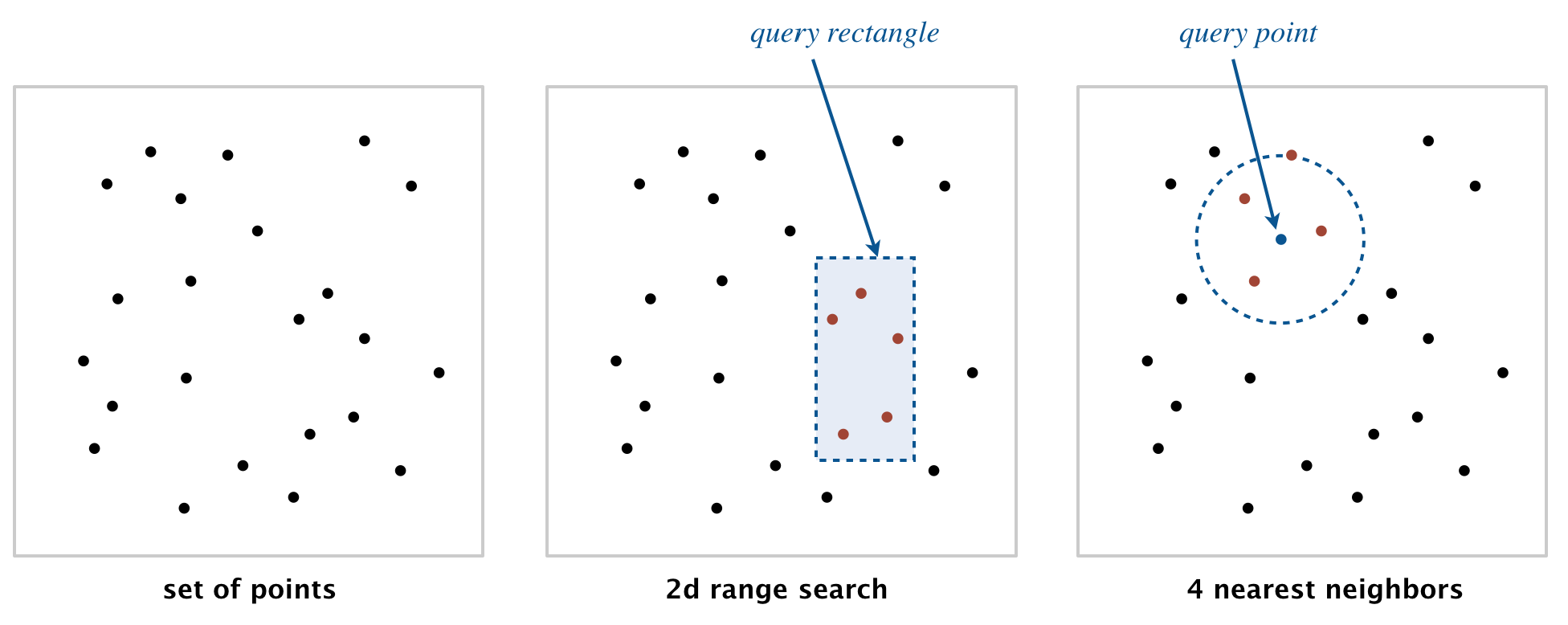
These operations have numerous applications, ranging from classifying astronomical objects and computer animation to speeding up neural networks and data mining (see lecture for more concrete examples). The performance of these operations is critical in many systems, for example, finding the nearest restaurant, the closest cell tower, or the neighbors of a particle in a physics simulation.
In this assignment, you will implement a symbol table whose keys are two-dimensional points, supporting both range search and nearest-neighbor search. You will build two implementations: a brute-force approach using a red-black BST, and an efficient approach using a 2d-tree. Since these are symbol tables, inserting a point that is already present replaces the old value with the new one. Methods that return an Iterable<Point2D>, such as points() and range(), return an iterable with zero points if there are no matching results. You can implement these by adding points to a Stack<Point2D> or Queue<Point2D> and returning it. If there are multiple nearest points, nearest() may return any one of them.
Geometric primitives
To get started, use the following geometric primitives for points and
axis-aligned rectangles in the plane. The immutable data type
Point2D
(part of algs4.jar) represents points in the plane. The immutable data type
RectHV
(part of algs4.jar) represents axis-aligned rectangles.
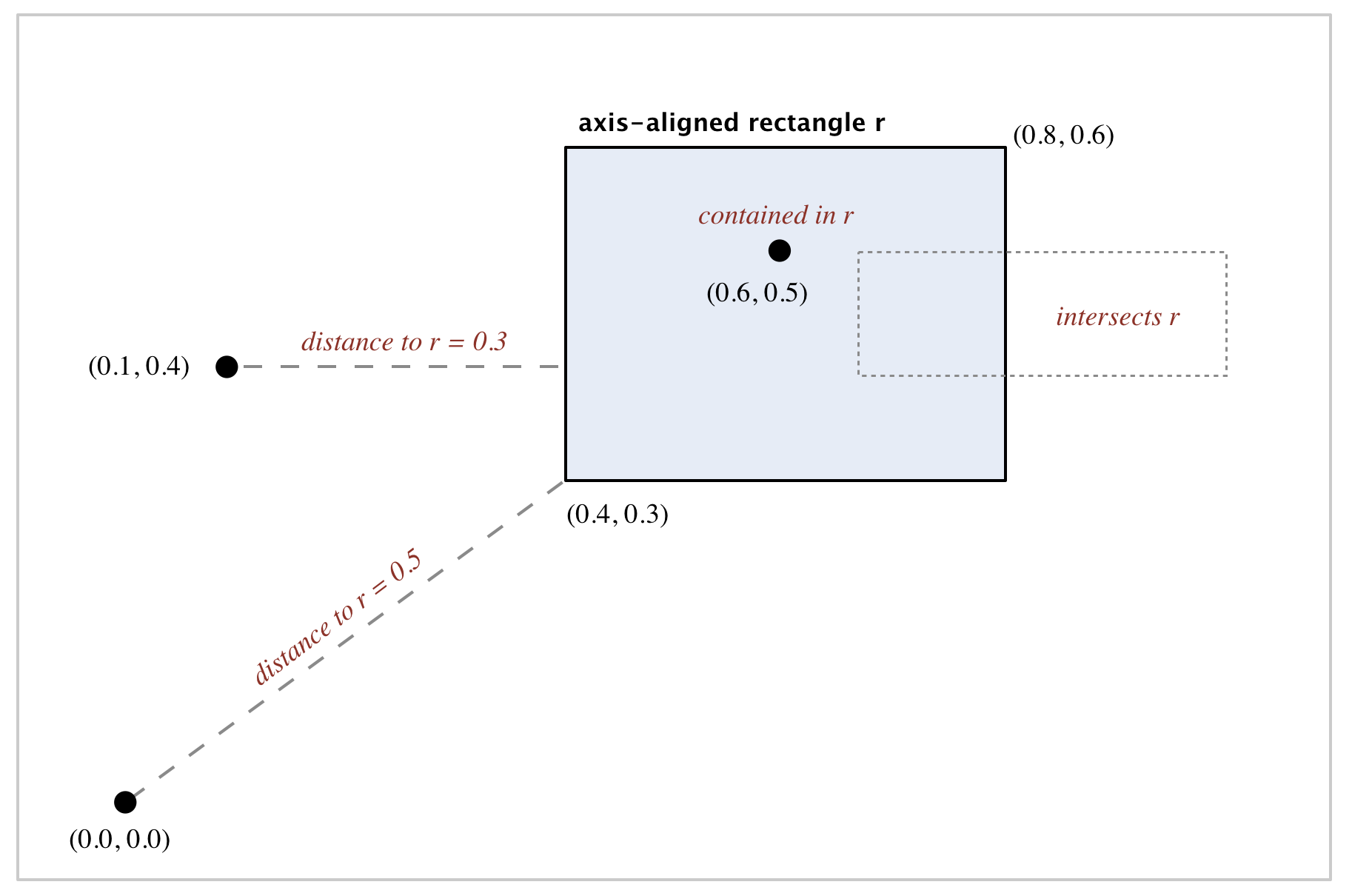
Here is a subset of the Point2D API that you may use:
public class Point2D implements Comparable<Point2D> {

    // construct the point (x, y)
    public Point2D(double x, double y)

    // x-coordinate
    public double x()

    // y-coordinate
    public double y()

    // square of Euclidean distance between two points
    public double distanceSquaredTo(Point2D that)

    // for use in an ordered symbol table
    public int compareTo(Point2D that)

    // does this point equal that object?
    public boolean equals(Object that)

    // string representation with format (x, y)
    public String toString()

}
Here is a subset of the RectHV API that you may use:
public class RectHV {

    // construct the rectangle [xmin, xmax] x [ymin, ymax]
    public RectHV(double xmin, double ymin, double xmax, double ymax)

    // minimum x-coordinate of rectangle
    public double xmin()

    // minimum y-coordinate of rectangle
    public double ymin()

    // maximum x-coordinate of rectangle
    public double xmax()

    // maximum y-coordinate of rectangle
    public double ymax()

    // does this rectangle contain the point p (either inside or on boundary)?
    public boolean contains(Point2D p)

    // does this rectangle intersect that rectangle (at one or more points)?
    public boolean intersects(RectHV that)

    // square of Euclidean distance from point p to closest point in rectangle
    public double distanceSquaredTo(Point2D p)

    // does this rectangle equal that object?
    public boolean equals(Object that)

    // string representation with format [xmin, xmax] x [ymin, ymax]
    public String toString()

}
Do not modify these data types.
Boundary and infinity
A point on the boundary of a rectangle is considered inside it, and two rectangles that share only a single point are considered to intersect. You can create a RectHV for the entire plane (or a halfplane) by using Double.POSITIVE_INFINITY or Double.NEGATIVE_INFINITY for one or more of the coordinates.
Part 1: Brute-Force Implementation
Write a mutable data type PointST.java that uses a red-black BST to represent a symbol table whose keys are two-dimensional points, by implementing the following API:
public class PointST<Value> {

    // construct an empty symbol table of points
    public PointST()

    // is the symbol table empty?
    public boolean isEmpty()

    // number of points
    public int size()

    // associate the value val with point p
    public void put(Point2D p, Value val)

    // value associated with point p
    public Value get(Point2D p)

    // does the symbol table contain point p?
    public boolean contains(Point2D p)

    // all points in the symbol table
    public Iterable<Point2D> points()

    // all points that are inside the rectangle (or on the boundary)
    public Iterable<Point2D> range(RectHV rect)

    // a nearest neighbor of point p; null if the symbol table is empty
    public Point2D nearest(Point2D p)

    // unit testing (optional)
    public static void main(String[] args)

}
Implementation requirement. You must use either RedBlackBST or java.util.TreeMap; do not implement your own red-black BST.
PointST Requirements
PointST()
- Behavior: Construct an empty symbol table of points.
- Performance: Constant time.
isEmpty()
- Behavior: Return
trueif the symbol table is empty,falseotherwise. - Performance: Constant time.
size()
- Behavior: Return the number of points in the symbol table.
- Performance: Constant time.
put(Point2D p, Value val)
- Behavior: Associate the value
valwith pointp. - Corner case: Throw
IllegalArgumentExceptionif either argument isnull. - Performance: $\Theta(\log n)$ in the worst case.
get(Point2D p)
- Behavior: Return the value associated with point
p, ornullif the point is not in the symbol table. - Corner case: Throw
IllegalArgumentExceptionif the argument isnull. - Performance: $\Theta(\log n)$ in the worst case.
contains(Point2D p)
- Behavior: Return
trueif the symbol table contains pointp,falseotherwise. - Corner case: Throw
IllegalArgumentExceptionif the argument isnull. - Performance: $\Theta(\log n)$ in the worst case.
points()
- Behavior: Return all points in the symbol table.
- Performance: $\Theta(n)$ in the worst case.
range(RectHV rect)
- Behavior: Return all points that are inside the rectangle (or on the boundary).
- Corner case: Throw
IllegalArgumentExceptionif the argument isnull. - Performance: $\Theta(n)$ in the worst case.
nearest(Point2D p)
- Behavior: Return a nearest neighbor of point
p; returnnullif the symbol table is empty. - Corner case: Throw
IllegalArgumentExceptionif the argument isnull. - Performance: $\Theta(n)$ in the worst case.
Part 2: 2d-Tree Implementation
Write a mutable data type KdTreeST.java that uses a 2d-tree to implement the same API (but renaming PointST to KdTreeST). A 2d-tree is a generalization of a BST to two-dimensional keys. The idea is to build a BST with points in the nodes, using the x- and y-coordinates of the points as keys in strictly alternating sequence, starting with the x-coordinates.
public class KdTreeST<Value> {

    // construct an empty symbol table of points
    public KdTreeST()

    // is the symbol table empty?
    public boolean isEmpty()

    // number of points
    public int size()

    // associate the value val with point p
    public void put(Point2D p, Value val)

    // value associated with point p
    public Value get(Point2D p)

    // does the symbol table contain point p?
    public boolean contains(Point2D p)

    // all points in the symbol table in level order
    public Iterable<Point2D> points()

    // all points that are inside the rectangle (or on the boundary)
    public Iterable<Point2D> range(RectHV rect)

    // a nearest neighbor of point p; null if the symbol table is empty
    public Point2D nearest(Point2D p)

    // unit testing (optional)
    public static void main(String[] args)

}
The API is the same as PointST, but the performance requirements are different. The requirements are listed at the bottom of this section: read the following subsections on how 2d-trees work first, as the requirements reference the pruning techniques described there.
Search and insert
The algorithms for search and insert are similar to those for BSTs, but at the root we use the x-coordinate (if the point to be inserted has a smaller x-coordinate than the point at the root, go left; otherwise go right); then at the next level, use the y-coordinate (if the point to be inserted has a smaller y-coordinate than the point in the node, go left; otherwise go right); then at the next level, use the x-coordinate; and so forth.
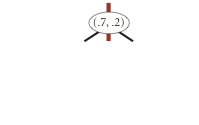
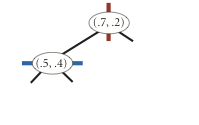
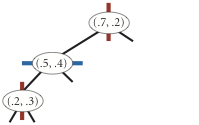
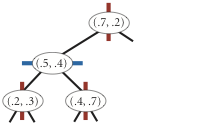
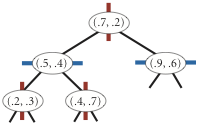
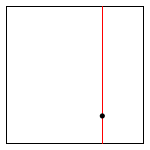
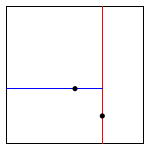
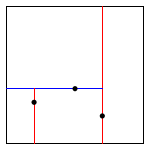
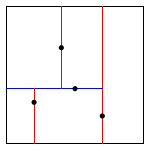
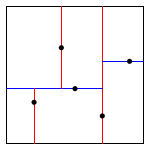
Note that "go right" when the coordinates are equal means that if a point has the same x-coordinate (or y-coordinate) as the point in a node, it goes to the right subtree.
Level-order traversal
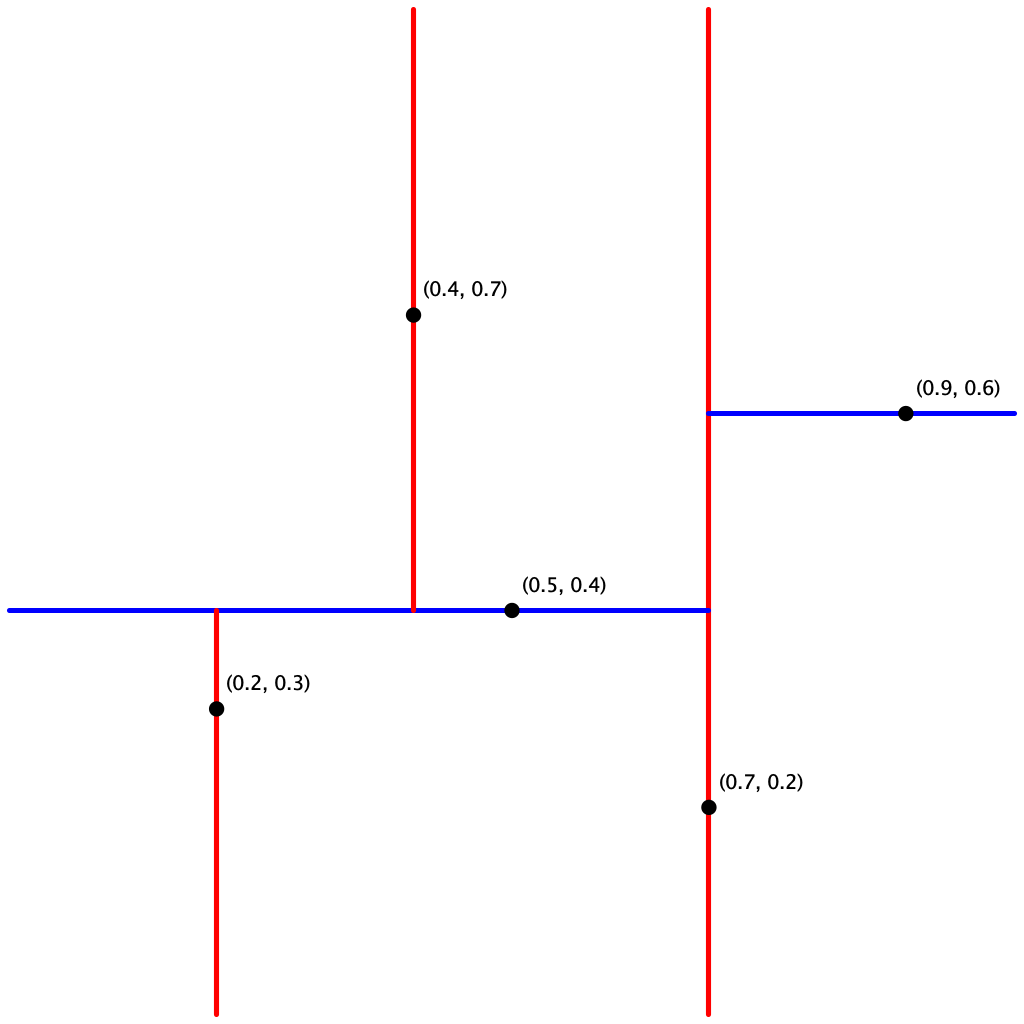
The points() method must return the points in level order: first the root, then all children of the root (from left/bottom to right/top), then all grandchildren of the root (from left to right), and so forth. The level-order traversal of the above 2d-tree is (0.7, 0.2), (0.5, 0.4), (0.9, 0.6), (0.2, 0.3), (0.4, 0.7). This method is useful to assist you (when debugging).
Range search and nearest-neighbor search
The prime advantage of a 2d-tree over a BST is that it supports efficient implementation of range search and nearest-neighbor search. Each node corresponds to an axis-aligned rectangle, which encloses all the points in its subtree. The root corresponds to the entire plane; the left and right children of the root correspond to the two rectangles split by the x-coordinate of the point at the root; and so forth.
Range search. To find all points contained in a given query rectangle, start at the root and recursively search for points in both subtrees using the following pruning rule: if the query rectangle does not intersect the rectangle corresponding to a node, there is no need to explore that node (or its subtrees). That is, search a subtree only if it might contain a point contained in the query rectangle.
Nearest-neighbor search. To find a closest point to a given query point, start at the root and recursively search in both subtrees using the following pruning rule: if the closest point discovered so far is closer than the distance between the query point and the rectangle corresponding to a node, there is no need to explore that node (or its subtrees). That is, search a node only if it might contain a point that is closer than the best one found so far. The effectiveness of the pruning rule depends on quickly finding a nearby point. To do this, organize the recursive method so that when there are two possible subtrees to go down, you choose first the subtree that is on the same side of the splitting line as the query point; the closest point found while exploring the first subtree may enable pruning of the second subtree.
KdTreeST Requirements
KdTreeST()
- Behavior: Construct an empty symbol table of points.
- Performance: Constant time.
isEmpty()
- Behavior: Return
trueif the symbol table is empty,falseotherwise. - Performance: Constant time.
size()
- Behavior: Return the number of points in the symbol table.
- Performance: Constant time.
put(Point2D p, Value val)
- Behavior: Associate the value
valwith pointp. - Corner case: Throw
IllegalArgumentExceptionif either argument isnull. - Performance: Proportional to the height of the tree.
get(Point2D p)
- Behavior: Return the value associated with point
p, ornullif the point is not in the symbol table. - Corner case: Throw
IllegalArgumentExceptionif the argument isnull. - Performance: Proportional to the height of the tree.
contains(Point2D p)
- Behavior: Return
trueif the symbol table contains pointp,falseotherwise. - Corner case: Throw
IllegalArgumentExceptionif the argument isnull. - Performance: Proportional to the height of the tree.
points()
- Behavior: Return all points in the symbol table in level order.
- Performance: $\Theta(n)$.
range(RectHV rect)
- Behavior: Return all points that are inside the rectangle (or on the boundary).
- Corner case: Throw
IllegalArgumentExceptionif the argument isnull. - Performance: Must use the pruning rule described above.
nearest(Point2D p)
- Behavior: Return a nearest neighbor of point
p; returnnullif the symbol table is empty. - Corner case: Throw
IllegalArgumentExceptionif the argument isnull. - Performance: Must prune subtrees whose corresponding rectangle cannot contain a closer point than the best found so far, and must explore the closer subtree first.
Additional guidance
Debugging performance errors is one of the biggest challenges in this assignment. It is very important that you understand and implement the key optimizations described above:
- Range-search pruning. Do not search a subtree whose corresponding rectangle does not intersect the query rectangle.
- Nearest-neighbor pruning. Do not search a subtree if no point (that could possibly be) in its corresponding rectangle could be closer to the query point than the best candidate point found so far. Nearest-neighbor pruning is most effective when you perform the recursive-call ordering optimization because finding a good candidate point early in the search enables you to do more pruning.
- Nearest-neighbor recursive-call ordering. When there are two subtrees to explore, choose first the subtree that is on the same side of the splitting line as the query point. This rule implies that if one of the two subtrees contains the query point, you will consider that subtree first.
Do not begin range() or nearest() until you understand these rules.
If you are new to recursive search tree code, use BST.java as a guide. The trickiest part is understanding how the put() method works. You do not need to include code that involves storing the subtree sizes (since this is used only for ordered symbol table operations).
Testing
Interactive clients
You may use the following interactive client programs to test and debug your code.
-
RangeSearchVisualizer.javareads a sequence of points from a file (specified as a command-line argument) and inserts those points into both aPointSTand aKdTreeST. Then, it performs range searches on the axis-aligned rectangles dragged by the user in the standard drawing window. It colors red the points returned byrange()inPointSTand blue the points returned byrange()inKdTreeST. -
NearestNeighborVisualizer.javareads a sequence of points from a file (specified as a command-line argument) and inserts those points into both aPointSTand aKdTreeST. Then, it performs nearest-neighbor queries on the point corresponding to the location of the mouse in the standard drawing window. It colors red the point returned bynearest()inPointSTand blue the point returned bynearest()inKdTreeST.
Warning: both of these clients will be slow for large inputs because (1) the methods in the brute-force implementation are slow and (2) drawing the points is slow.
Testing tips
Sample input files. Download kdtree.zip. It contains sample input files in the specified format.
- The example in the assignment specification uses
input5.txt. - The example in the lecture slides uses
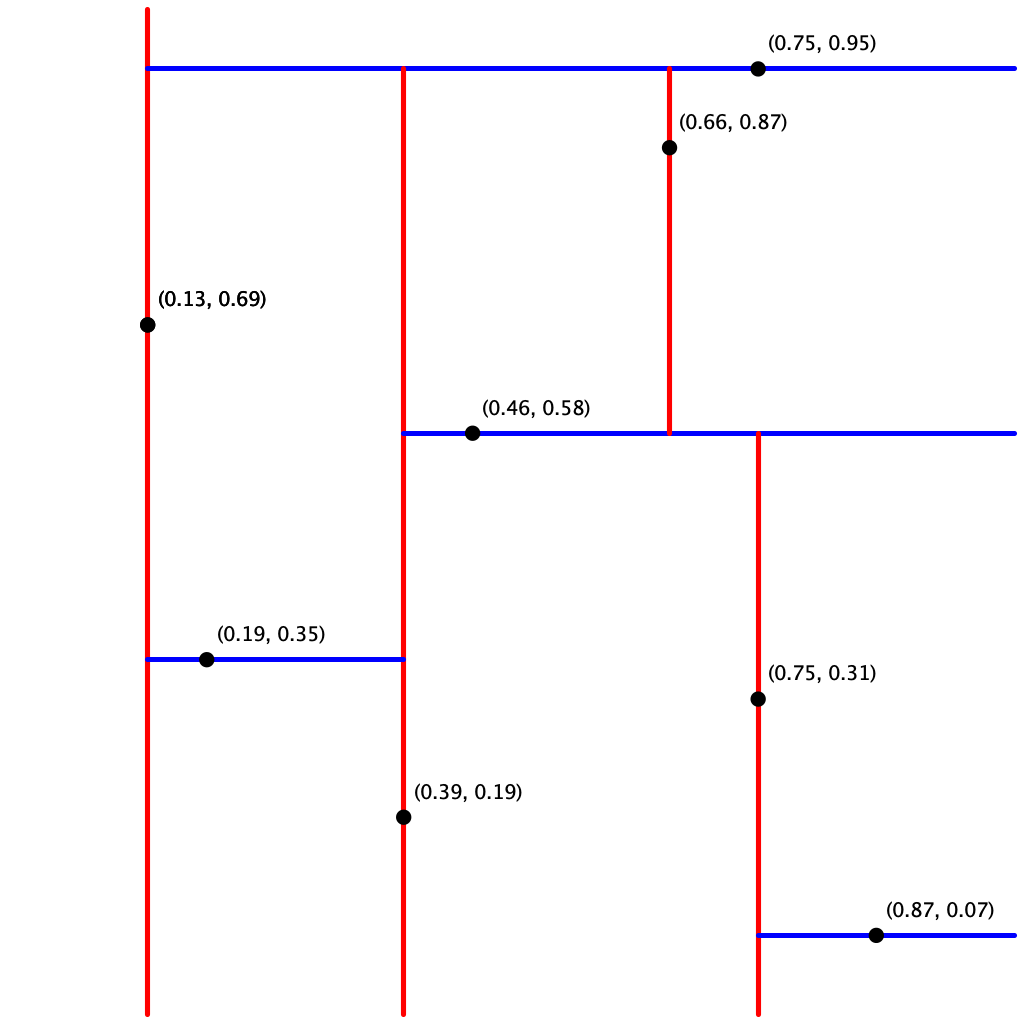
input10.txt.
Testing the bounding boxes. If you include the RectHV bounding boxes in the kd-tree nodes, you want to make sure that you got it right. Otherwise, the mistake might not manifest itself until range search and/or nearest-neighbor search. Here are the bounding boxes corresponding to the nodes in input5.txt:
- $(0.7, 0.2)$: $[-\infty, \infty] \times [-\infty, \infty]$
- $(0.5, 0.4)$: $[-\infty, 0.7] \times [-\infty, \infty]$
- $(0.9, 0.6)$: $[0.7, \infty] \times [-\infty, \infty]$
- $(0.2, 0.3)$: $[-\infty, 0.7] \times [-\infty, 0.4]$
- $(0.4, 0.7)$: $[-\infty, 0.7] \times [0.4, \infty]$
Here, we follow the toString() method format of RectHV which is $[x_{min}, x_{max}] \times [y_{min}, y_{max}]$.
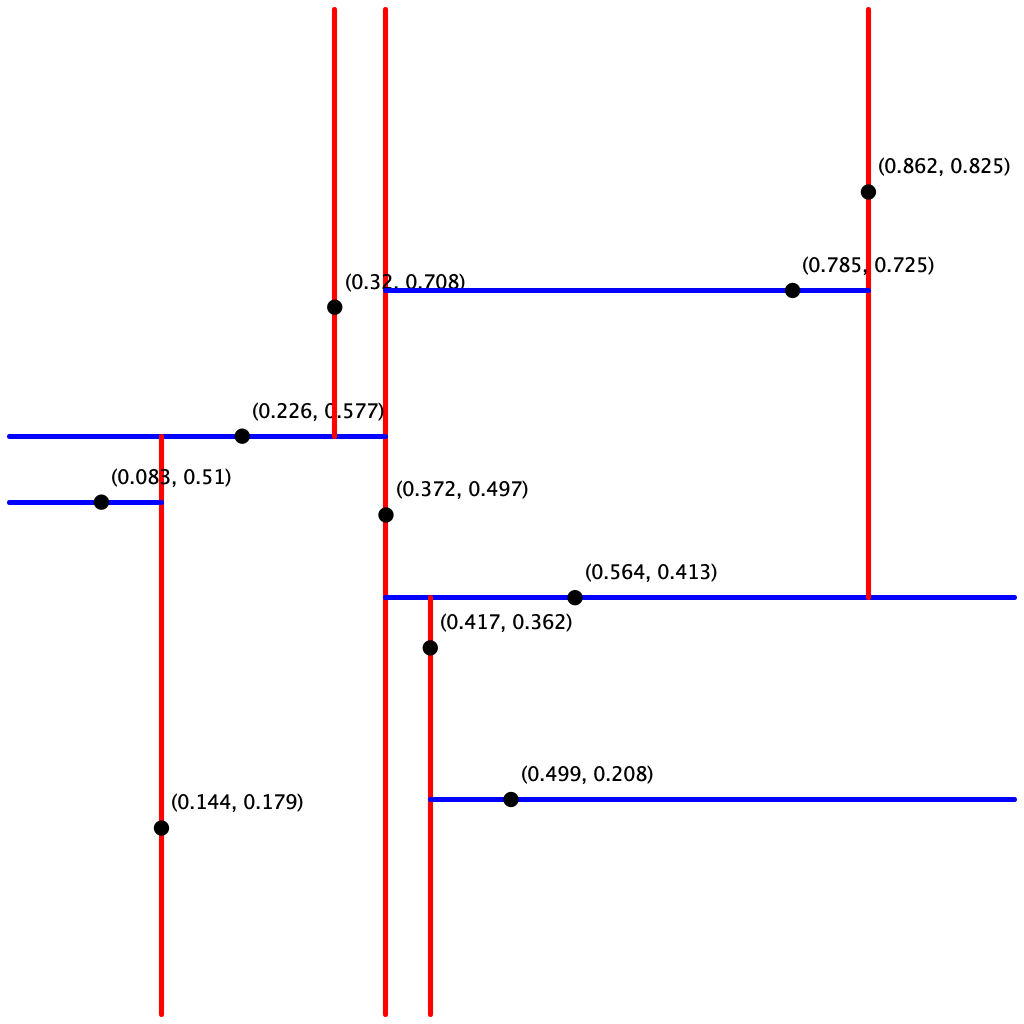
Testing put() and points(). The client KdTreeVisualizer.java reads a sequence of points from a file (given as a command-line argument) and draws the corresponding kd-tree. It does so by reconstructing the kd-tree from the level-order traversal returned by points(). Note that it assumes all points are inside the unit square.
Testing range() and nearest(). A good way to test these methods is to perform the same sequence of operations on both the PointST and KdTreeST data types and identify any discrepancies. The brute-force implementation PointST can serve as a reference solution for testing.
Deliverables
Project files
The file kdtree.zip contains sample data files and test clients. It also contains feedback.txt, which you should fill out, and acknowledgments.txt, which you should complete with citations and collaboration information.
Submission
Submit PointST.java and KdTreeST.java.
Do not call any library functions other than those in
java.lang,
java.util,
and algs4.jar.
Finally, submit feedback.txt and acknowledgments.txt files and answer the questions.
| File | Purpose |
|---|---|
PointST.java |
Brute-force symbol table using a red-black BST. |
KdTreeST.java |
Efficient symbol table using a 2d-tree. |
feedback.txt |
Answers the assignment feedback questions. |
acknowledgments.txt |
Lists collaborators and external resources used. |
Advice and Enrichment
Suggested Approach
To help you work through the assignment, here is a suggested list of steps for how you might make progress. You don't have to follow this list to complete the assignment and in fact we recommend you don't look at it unless you get stuck.
List of steps.
-
Implement
PointST. This should be straightforward if you useRedBlackBSTorTreeMapand are familiar with the subset of thePoint2DandRectHVAPIs that you may use. After completing this step, you are only about 15% done with the assignment. -
Node data type. There are several reasonable ways to represent a node in a 2d-tree. One approach is to include the point, a link to the left/bottom subtree, a link to the right/top subtree, and an axis-aligned rectangle corresponding to the node:
private class Node { private Point2D p; // the point private Value val; // the symbol table maps the point to this value private RectHV rect; // the axis-aligned rectangle corresponding to this node private Node lb; // the left/bottom subtree private Node rt; // the right/top subtree } -
Write a simplified version of
put()which does everything except set up theRectHVfor each node. Write theget()andcontains()methods, and use these to test thatput()was implemented properly. Note thatput()andget()are best implemented by using private helper methods analogous to those found in BST.java. We recommend using the orientation (vertical or horizontal) as an argument to these helper methods.A common error is to not rely on your base case (or cases). For example, compare these two
get()methods for searching in a BST:private Value get(Node x, Key key) { if (x == null) return null; int cmp = key.compareTo(x.key); if (cmp < 0) return get(x.left, key); else if (cmp > 0) return get(x.right, key); else return x.val; }private Value overlyComplicatedGet(Node x, Key key) { if (x == null) return null; int cmp = key.compareTo(x.key); if (cmp < 0) { if (x.left == null) return null; else return overlyComplicatedGet(x.left, key); } else if (cmp > 0) { if (x.right == null) return null; else return overlyComplicatedGet(x.right, key); } else return x.val; }The second method performs extraneous null checks that would otherwise be caught by the base case. When there are multiple base cases, these extraneous checks proliferate and make your code harder to read, maintain, and debug. Trust in the base case.
-
Implement
points(). Use this to check the structure of your kd-tree. -
Add code to
put()which sets up theRectHVfor eachNode. -
Write
range(). Test your implementation usingRangeSearchVisualizer.java, which is described in the testing section. -
Write
nearest(). This is the hardest method. We recommend doing it in stages.- First, find the nearest neighbor without pruning. That is, always explore both subtrees. Moreover, always explore the left subtree before the right subtree.
- Next, implement the pruning rule: if the closest point discovered so far is closer than the distance between the query point and the rectangle corresponding to a node, there is no need to explore that node (or its subtrees).
- Finally, implement the recursive-call order optimization: when there are two subtrees to explore, always choose first the subtree that is on the same side of the splitting line as the query point.
Test your implementation using
NearestNeighborVisualizer.java, which is described in the testing section.
Leaderboard
The leaderboard is an optional, ungraded challenge where you can compare the performance of your KdTreeST implementation against other students. Submit your solution to the separate leaderboard TigerFile instance for a friendly competition — you choose a nickname when submitting, so your identity can remain anonymous. The leaderboard measures the number of nearest-neighbor calls per second your implementation can handle.
Optional: Performance Comparison
Once both implementations are working, try the following experiment to see the difference that pruning makes. Using input1M.txt (1 million points), perform many nearest-neighbor searches with random query points in the unit square. Compare how many nearest-neighbor calls per second each implementation can handle. You should observe a dramatic difference between PointST and KdTreeST — this is the power of geometric pruning.
Here is one reasonable approach to the experiment:
- Read
input1M.txtand insert the 1 million points into both data structures. - Perform $m$ calls to
nearest()with random query points in the unit square. To generate a random point, callStdRandom.uniformDouble(0.0, 1.0)for each coordinate. - Measure the total CPU time $t$ (in seconds) for only the calls to
nearest(). You can useStopwatchorStopwatchCPU. Do not include the time to read the points or construct the data structures. - Use $m / t$ as an estimate of the number of calls per second.
Choose $m$ so that the CPU time $t$ is neither negligible (e.g., less than 1 second) nor astronomical (e.g., more than 1 hour). Do not use -Xint.