Learning objectives:
- Implement efficient search using binary search and sorting
- Use the
ComparableandComparatorinterfaces to define multiple orderings - Apply algorithmic thinking to a real-world application
Preamble
A quick reminder on the course policy. The autograder provides feedback only, it does not determine your grade. See the assignment FAQ for more details on the grading policy.
Our recommendation. Write your own code from scratch and aim to complete every requirement by the completion deadline. Treat each assignment as if the autograder score determined your grade. Working code that you understand is the sweet spot: it makes demos easy and reflects real learning. Start early to give yourself time to debug.
You will need to understand two Java interfaces to complete this assignment:
Comparable and Comparator. We review them here, but you are free to skip
this section if you are comfortable with the topics. The video shared on Ed goes
over this in case you prefer to watch a presentation on the topic.
Natural order (Comparable)
A class implements Comparable<T> to define its natural order—the default way
objects of that type are compared. When a class implements Comparable<T> it
needs to have a method compareTo(), which is an instance method that compares
this object to another object of the same type:
public class String implements Comparable<String> {
    ...
    public int compareTo(String that) { ... }
}
The return value should apply the following standard convention:
- negative if
thisis less thanthat - zero if
thisis equal tothat - positive if
thisis greater thanthat
For example, String implements Comparable<String> using lexicographic order: strings are compared character-by-character, and if one string is a prefix of the other, the shorter string comes first. So "cat" is less than "dog", and "dog" is less than "dogcatcher".
Alternate orders (Comparator)
A Comparator<T> defines an alternate order—a way of comparing objects that differs from the natural order. Unlike Comparable, which is built into the class itself, a Comparator is a separate class whose sole purpose is to define a particular ordering. You typically create it as a private nested class inside the class whose objects you want to compare.
For example, suppose a Student class has a natural order by name. You could define alternate orders to compare students by GPA, by graduation year, etc. Each alternate order would be its own nested class that implements Comparator<Student>. A Comparator must provide a compare() method that takes two objects and returns a negative, zero, or positive integer (same convention as compareTo()):
Static methods returning Comparators. A common pattern is to pair each nested comparator class with a static method that returns an instance of it. Since the method is static, there is one method for the entire class (not one per object). Here is a sketch of how this looks inside Student:
public class Student implements Comparable<Student> {
    ...
    public int compareTo(Student that) { ... }  // natural order (by name)

    public static Comparator<Student> byGPA() {
        return new GPAOrder();
    }

    private static class GPAOrder implements Comparator<Student> {
        public int compare(Student a, Student b) {
            ...
        }
    }
}
Parameterized Comparators. When a comparator depends on a parameter, the nested class should have a constructor that takes the parameter and saves it in an instance variable.
Sorting with Comparators. You can sort using either the natural order or an alternate order:
Arrays.sort(a);              // sort by natural order (Comparable)
Arrays.sort(a, comparator);  // sort by alternate order (Comparator)
Autocomplete
Write a program to implement autocomplete for a given set of $n$ terms, where a term is a query string and an associated non-negative weight. That is, given a prefix, find all queries that start with the given prefix, in descending order of weight.
Autocomplete is pervasive in modern applications. As the user types, the program predicts the complete query (typically a word or phrase) that the user intends to type. Autocomplete is most effective when there are a limited number of likely queries. For example, the Internet Movie Database uses it to display the names of movies as the user types; search engines use it to display suggestions as the user enters web search queries; cell phones use it to speed up text input.
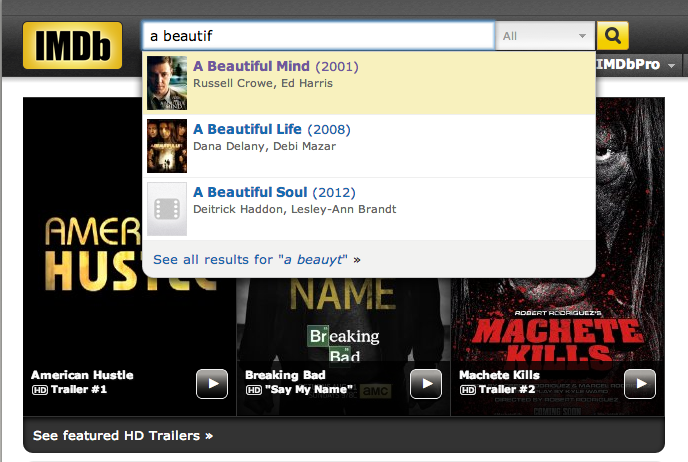

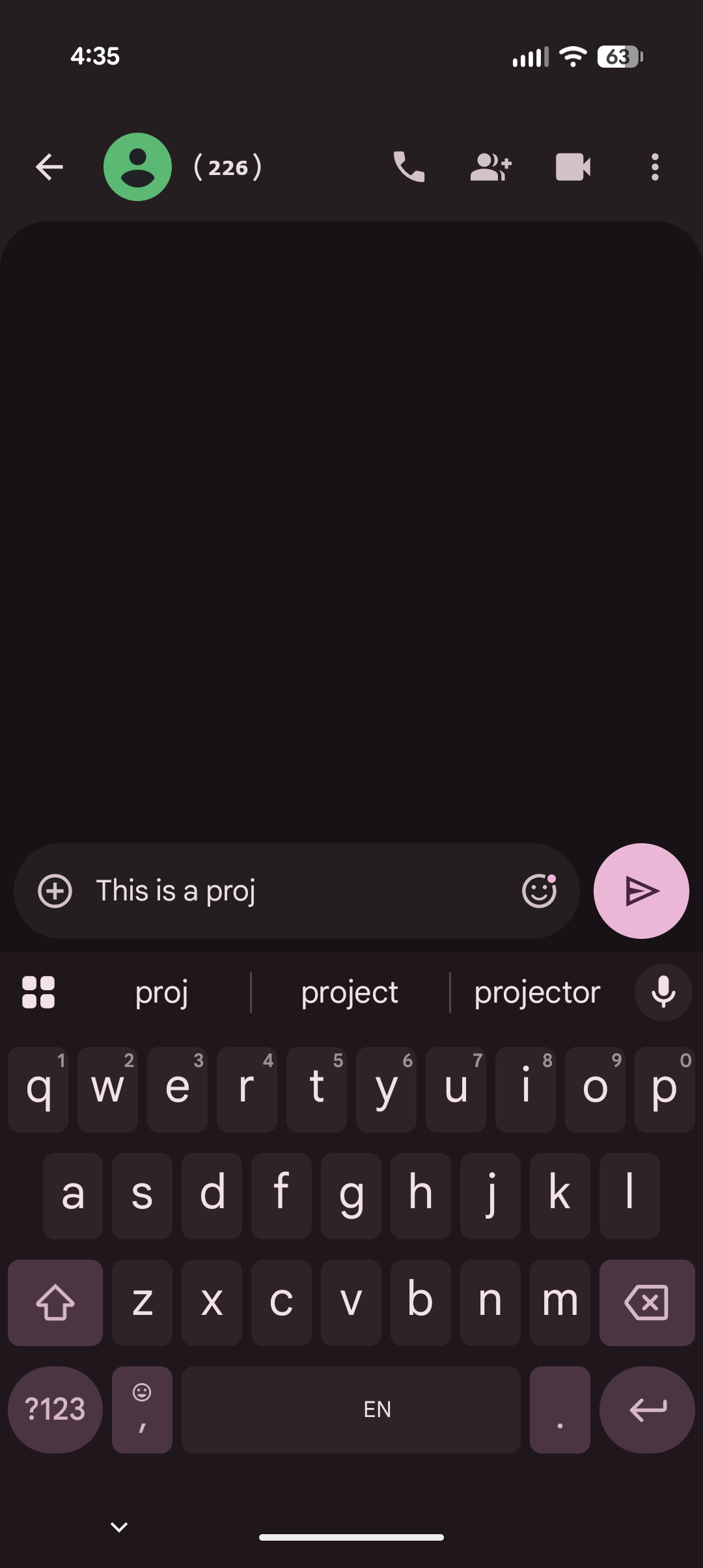
In these examples, the application predicts how likely it is that the user is typing each query and presents to the user a list of the top-matching queries, in descending order of weight. These weights are determined by historical data, such as box office revenue for movies, frequencies of search queries from other Google users, or the typing history of a cell phone user. For the purposes of this assignment, you will have access to a set of all possible queries and associated weights (and these queries and weights will not change).
The performance of autocomplete functionality is critical in many systems. For example, consider a search engine which runs an autocomplete application on a server farm. According to one study, the application has only about 50ms to return a list of suggestions for it to be useful to the user. Moreover, in principle, it must perform this computation for every keystroke typed into the search bar and for every user!
In this assignment, you will implement autocomplete by sorting the terms by query string; binary searching to find all query strings that start with a given prefix; and sorting the matching terms by weight.
Part 1: Autocomplete Term
Write an immutable data type Term.java that represents an autocomplete term—a query string and an associated integer weight. You must implement the following API, which supports comparing terms by three different orders: lexicographic order by query string (the natural order); in descending order by weight (an alternate order); and lexicographic order by query string but using only the first $r$ characters (a family of alternate orderings). The last order may seem a bit odd, but you will use it in Part 3 to find all query strings that start with a given prefix (of length $r$).
public class Term implements Comparable<Term> {

    // Initializes a term with the given query string and weight.
    public Term(String query, long weight)

    // Compares the two terms in descending order by weight.
    public static Comparator<Term> byReverseWeightOrder()

    // Compares the two terms in lexicographic order,
    // but using only the first r characters of each query.
    public static Comparator<Term> byPrefixOrder(int r)

    // Compares the two terms in lexicographic order by query.
    public int compareTo(Term that)

    // Returns a string representation of this term in the following format:
    // the weight, followed by a tab, followed by the query.
    public String toString()

    // unit testing
    public static void main(String[] args)

}
API requirements
Reminder: as in all assignments, you must implement the API exactly as specified, with the identical set of public methods and signatures. Extra private methods are permitted and encouraged.
Term Requirements
Term(String query, long weight)
- Behavior: Initialize a term with the given query string and weight.
- Corner case: Throw
IllegalArgumentExceptionifqueryisnullorweightis negative.
byReverseWeightOrder()
- Behavior: Return a
Comparator<Term>that compares two terms in descending order by weight.
byPrefixOrder(int r)
- Behavior: Return a
Comparator<Term>that compares two terms in lexicographic order, but using only the first $r$ characters of each query. - Corner case: Throw
IllegalArgumentExceptionif $r$ is negative.
compareTo(Term that)
- Behavior: Compare the two terms in lexicographic order by query.
toString()
- Behavior: Return a string representation of this term in the following format: the weight, followed by a tab, followed by the query.
Performance requirement: The string comparison methods must take time proportional to the number of characters needed to resolve the comparison. For example, if byPrefixOrder(r) is comparing two queries that differ in their first character, the comparison should resolve after examining one character—not after examining all $r$ characters.
Unit testing
You are not required to create unit tests for this class, and the autograder
will not check them. However, writing tests in your main() method is a good
way to verify your implementation works correctly.
Suggested unit tests for Term
- Create a few
Termobjects and compare them using thecompareTo()method and eachComparator. - For each order, perform at least three compares: one that results in a negative number, one that results in a positive number, and one that results in zero.
- Comment your code to explain the expected result for each compare and why it should result in a negative, positive, or zero value.
Part 2: Binary Search
When binary searching a sorted array that contains more than one key equal to the search key, the client may want to know the index of either the first or the last such key. Accordingly, implement the following API:
public class BinarySearchDeluxe {

    // Returns the index of the first key in the sorted array a[]
    // that is equal to the search key, or -1 if no such key.
    public static <Key> int firstIndexOf(Key[] a, Key key, Comparator<Key> comparator)

    // Returns the index of the last key in the sorted array a[]
    // that is equal to the search key, or -1 if no such key.
    public static <Key> int lastIndexOf(Key[] a, Key key, Comparator<Key> comparator)

    // unit testing
    public static void main(String[] args)
}
Generic methods. The <Key> type parameter is an example of a generic method. It enforces the constraint that the type of the elements in the array a[] must match the type of the search key key—so the compiler would allow searching for a String in a String[] array but reject searching for an Integer in a String[] array.
BinarySearchDeluxe Requirements
firstIndexOf(Key[] a, Key key, Comparator<Key> comparator)
- Behavior: Return the index of the first key in the sorted array
a[]that is equal to the search key, or $-1$ if no such key. - Precondition: The array is in sorted order with respect to the supplied
Comparator. - Corner case: Throw
IllegalArgumentExceptionif any argument isnull. - Performance: At most $1 + \lceil \log_2 n \rceil$ compares in the worst case, where $n$ is the length of the array.
lastIndexOf(Key[] a, Key key, Comparator<Key> comparator)
- Behavior: Return the index of the last key in the sorted array
a[]that is equal to the search key, or $-1$ if no such key. - Precondition: The array is in sorted order with respect to the supplied
Comparator. - Corner case: Throw
IllegalArgumentExceptionif any argument isnull. - Performance: At most $1 + \lceil \log_2 n \rceil$ compares in the worst case, where $n$ is the length of the array.
In this context, a compare is one call to comparator.compare().
Side effects: firstIndexOf() and lastIndexOf() must not modify the argument array.
No linear scan
You cannot use binary search to find any matching key and then do a linear scan to find the first or last. That approach makes $\Theta(n)$ compares in the worst case (e.g., if all keys are equal to the search key). Instead, modify the binary search algorithm itself to find the first (or last) matching key directly.
Unit testing
You are not required to create unit tests for this class, and the autograder
will not check them. However, writing tests in your main() method is a good
way to verify your implementation works correctly. It's pretty easy to miss
corner cases in the implementation of BinarySearchDeluxe, so we recommend
implementing the following unit tests.
Suggested unit tests for BinarySearchDeluxe
Implement a "brute force" test. This test should essentially reimplement the firstIndexOf() and lastIndexOf() methods using a much simpler (but inefficient) algorithm.
- Take an integer $n$ as a command-line argument and create a sorted array
testArray[]of $5n$ integers: 5 copies of 1, followed by 5 copies of 2, ..., followed by 5 copies of $n$. For example, if $n = 3$, thentestArray = {1, 1, 1, 1, 1, 2, 2, 2, 2, 2, 3, 3, 3, 3, 3}. - Pick a uniformly random integer between $0$ (inclusive) and $n + 1$ (exclusive) and call it
key. - Call
firstIndexOf()andlastIndexOf()ontestArray[], with keykeyand the default integerComparator(Tip: the expressionInteger::comparecan be used as aComparatorobject). - Calculate the expected result of
firstIndexOf()andlastIndexOf()by implementing a $\Theta(n)$ algorithm that iterates through all the elements. - Check if the expected result matches the output of running the
firstIndexOf()andlastIndexOf()methods and print an error message if not. - You might want to print the value of
keyas part of your test so that, if the unit test detects an error, you can manually inspect the source of the bug.
Part 3: Autocomplete
In this part, you will implement a data type that provides autocomplete functionality for a given set of string and weights, using Term and BinarySearchDeluxe. To do so, sort the terms in lexicographic order; use binary search to find all query strings that start with a given prefix; and sort the matching terms in descending order by weight. Organize your program by creating an immutable data type Autocomplete with the following API:
public class Autocomplete {

    // Initializes the data structure from the given array of terms.
    public Autocomplete(Term[] terms)

    // Returns all terms that start with the given prefix,
    // in descending order of weight.
    public Term[] allMatches(String prefix)

    // Returns the number of terms that start with the given prefix.
    public int numberOfMatches(String prefix)

    // unit testing
    public static void main(String[] args)

}
Queries are case-sensitive. Do not assume that the constructor receives the terms in any particular order. Don't reimplement sorting—use Arrays.sort() or one of the sorting algorithms in algs4.jar. If there are no matching terms, allMatches() should return an array of length 0. The empty-string prefix "" should match all queries.
Autocomplete Requirements
Autocomplete(Term[] terms)
- Behavior: Initialize the data structure from the given array of terms.
- Corner case: Throw
IllegalArgumentExceptionif either its argument array isnullor any entry isnull. - Performance: $O(n \log n)$ compares, where $n$ is the number of terms.
allMatches(String prefix)
- Behavior: Return all terms that start with the given prefix, in descending order of weight.
- Corner case: Throw
IllegalArgumentExceptionif its argument isnull. - Performance: $O(m \log m + \log n)$ compares, where $m$ is the number of matching terms.
numberOfMatches(String prefix)
- Behavior: Return the number of terms that start with the given prefix.
- Corner case: Throw
IllegalArgumentExceptionif its argument isnull. - Performance: $O(\log n)$ compares.
In this context, a compare is one call to any of the compare() or compareTo() methods defined in Term.
Side effects: Your methods must not modify the client's terms[] array. Make a defensive copy in the constructor.
Unit testing
We provide a sample client for unit testing below. It takes the name of an input file and an integer $k$ as command-line arguments. It reads the data from the file; then it repeatedly reads autocomplete queries from standard input, and prints the top $k$ matching terms in descending order of weight.
public static void main(String[] args) {

    // read in the terms from a file
    String filename = args[0];
    In in = new In(filename);
    int n = in.readInt();
    Term[] terms = new Term[n];
    for (int i = 0; i < n; i++) {
        long weight = in.readLong();           // read the next weight
        in.readChar();                         // scan past the tab
        String query = in.readLine();          // read the next query
        terms[i] = new Term(query, weight);    // construct the term
    }

    // read in queries from standard input and print the top k matching terms
    int k = Integer.parseInt(args[1]);
    Autocomplete autocomplete = new Autocomplete(terms);
    while (StdIn.hasNextLine()) {
        String prefix = StdIn.readLine();
        Term[] results = autocomplete.allMatches(prefix);
        StdOut.printf("%d matches\n", autocomplete.numberOfMatches(prefix));
        for (int i = 0; i < Math.min(k, results.length); i++)
            StdOut.println(results[i]);
    }
}
We provide a number of sample input files for testing. Each file consists of an integer $n$ followed by $n$ pairs of query strings and non-negative weights. There is one pair per line, with the weight and string separated by a tab. A weight can be any integer between 0 and $2^{63} - 1$. A query string can be any sequence of Unicode characters, including spaces (but not newlines).
- The file
wiktionary.txtcontains the 10,000 most common words in Project Gutenberg, with weights proportional to their frequencies. - The file
cities.txtcontains 93,827 cities, with weights equal to their populations.
If you want to try it on other files, here is a long collection of samples.
All sample input files
| File | Count | Term | Weight | Source |
|---|---|---|---|---|
pu-buildings.txt |
166 | Princeton buildings | age (in Y10K) | |
pokemon.txt |
729 | Pokemon | popularity | Allen Qin |
fortune1000.txt |
1,000 | company | revenue | Fortune 1000 |
nasdaq.txt |
2,658 | NASDAQ | market cap | nasdaq.com |
metal-albums.txt |
3,000 | metal albums | votes | Metal Storm |
pu-courses.txt |
6,771 | course | enrollment | Princeton Registrar |
wiktionary.txt |
10,000 | word | frequency | Wiktionary |
redditors.txt |
10,000 | redditor | subscribers | redditlist.com |
baby-names.txt |
31,109 | first name | frequency | U.S. Social Security |
trademarks.txt |
92,254 | company | U.S. trademark number | USPTO |
cities.txt |
93,827 | city | population | geoba.se |
mandarin.txt |
94,339 | Mandarin word | frequency | Invoke IT |
bing.txt |
250,000 | word | Bing search frequency | Microsoft Web N-gram |
2grams.txt |
277,718 | 2-gram | frequency | Google Web Trillion Word Corpus |
words-333333.txt |
333,333 | word | frequency | Google Web Trillion Word Corpus |
artists.txt |
43,849 | music artist | familiarity | Million Song Dataset |
songs.txt |
922,230 | song | hotttnesss | Million Song Dataset |
alexa.txt |
1,000,000 | web site | frequency | Alexa |
imdb-votes.txt |
82,455 | movie | number of votes | Internet Movie Database |
movies.txt |
229,447 | movies | revenue (USD) | Internet Movie Database |
actors.txt |
2,875,183 | actors | revenue (USD) | Internet Movie Database |
3grams.txt |
1,020,009 | 3-gram | frequency | Corpus of Contemporary American English |
4grams.txt |
1,034,308 | 4-gram | frequency | Corpus of Contemporary American English |
5grams.txt |
1,044,269 | 5-gram | frequency | Corpus of Contemporary American English |
~/Desktop/autocomplete> more wiktionary.txt
1000
   5627187200   the
   3395006400   of
   2994418400   and
   2595609600   to
   1742063600   in
   1176479700   i
   1107331800   that
   1007824500   was
    879975500   his
                ...
       392323   calves
~/Desktop/autocomplete> more cities.txt
93827
14608512 Shanghai, China
13076300 Buenos Aires, Argentina
12691836 Mumbai, India
12294193 Mexico City, Distrito Federal, Mexico
11624219 Karachi, Pakistan
11174257 İstanbul, Turkey
10927986 Delhi, India
10444527 Manila, Philippines
10381222 Moscow, Russia
...
2 Al Khāniq, YemenHere are a few sample executions:
~/Desktop/autocomplete> java-algs4 Autocomplete wiktionary.txt 5
auto
2 matches
        619695  automobile
        424997  automatic
comp
52 matches
      13315900  company
       7803980  complete
       6038490  companion
       5205030  completely
       4481770  comply
the
38 matches
    5627187200  the
     334039800  they
     282026500  their
     250991700  them
     196120000  there

~/Desktop/autocomplete> java-algs4 Autocomplete cities.txt 7
M
7211 matches
    12691836  Mumbai, India
    12294193  Mexico City, Distrito Federal, Mexico
    10444527  Manila, Philippines
    10381222  Moscow, Russia
     3730206  Melbourne, Victoria, Australia
     3268513  Montréal, Quebec, Canada
     3255944  Madrid, Spain
Al M
39 matches
      431052  Al Maḩallah al Kubrá, Egypt
      420195  Al Manşūrah, Egypt
      290802  Al Mubarraz, Saudi Arabia
      258132  Al Mukallā, Yemen
      227150  Al Minyā, Egypt
      128297  Al Manāqil, Sudan
       99357  Al Maţarīyah, Egypt
Deliverables
Project files
The file autocomplete.zip contains sample data files and test clients. It also contains feedback.txt, which you should fill out, and acknowledgments.txt, which you should complete with citations and collaboration information.
Submission
Submit Autocomplete.java, BinarySearchDeluxe.java, and Term.java.
Do not call any library functions other than those in
java.lang,
java.util,
and algs4.jar.
Finally, submit feedback.txt and acknowledgments.txt files and answer the questions.
| File | Purpose |
|---|---|
Term.java |
Implements the autocomplete term data type with three orderings. |
BinarySearchDeluxe.java |
Implements first/last binary search for sorted arrays with duplicates. |
Autocomplete.java |
Implements the autocomplete data type using Term and BinarySearchDeluxe. |
feedback.txt |
Answers the assignment feedback questions. |
acknowledgments.txt |
Lists collaborators and external resources used. |
Advice and Enrichment
Suggested Approach
To help you work through the assignment, here is a suggested list of steps for how you might make progress. You don't have to follow this list to complete the assignment and in fact we recommend you don't look at it unless you get stuck.
List of steps.
-
Download
autocomplete.zip, which contains sample input files and an interactive test client. -
Implement
Term.java.- Begin with the constructor and
toString(). - Next, add
implements Comparable<Term>to the class declaration and implement thecompareTo()method. - Then, implement
byReverseWeightOrder(). In support of this method, you will need to define a private static nested class, as described in the preamble. - Finally, implement
byPrefixOrder(). In support of this method, you will need to define another private static nested class. Since the comparator depends on an integer parameter $r$, the nested class should have a constructor that takes $r$ as an argument and saves it in an instance variable.
- Begin with the constructor and
-
Implement
BinarySearchDeluxe.java. Binary search is a deceptively simple algorithm. Jon Bentley reports that in an experiment at Bell Labs and IBM, only about 10% of professional programmers got it right—so test, debug, test.- A common error is for binary search to work correctly on a variety of inputs but go into an infinite loop on others. Be sure to test your program on many inputs. If you have an infinite loop, print out all of your loop-control variables, such as
lo,mid, andhi, to see where it stalls.
- A common error is for binary search to work correctly on a variety of inputs but go into an infinite loop on others. Be sure to test your program on many inputs. If you have an infinite loop, print out all of your loop-control variables, such as
-
Implement
Autocomplete. You will need to use all three orders defined inTerm: the natural order, reverse order by weight, and lexicographic order based on the first $r$ characters.- Use
Arrays.sort()for sorting. - Test with the sample client given in the specification.
- Use
Enrichment
Top-k matching
The assignment asks you to find all matching terms and then sort them. But what if you only want the top-$k$ matching terms? This problem can be formulated as a range minimum query problem, or equivalently as a lowest common ancestor problem. Some approaches:
- Build a Cartesian tree and do the LCA computation directly (by following parent pointers until they meet). If the tree is reasonably balanced, this works well in practice but has no worst-case guarantees.
- Use segment trees, as in this paper, to solve the maximum query problem in $O(\log n)$ time per query.
- Use an algorithm by Bender and Farach-Colton (paper) to solve the maximum query problem in $O(1)$ time per query.
Prefix-length search
Is there a way to find the range of terms that start with a given prefix in time proportional to the length of the prefix (rather than $\log n$)? Yes—use a suffix tree (or a suffix array with the LCP array), where the terms are separated by a word-separation symbol and concatenated together. For space proportional to the number of terms, consider a suffix array on words or a compact DAWG.