3. Conjunction Function
Download project ZIP
| Submit to TigerFile
In this assignment, you will implement functions that manipulates digital audio, then use them to create an audio collage. You will learn how to develop reusable functions, pass and return arrays, and manipulate audio.
Getting Started
- Read Sections 2.1 and 2.2 of the textbook and review the corresponding lectures and precepts.
- Download and unzip functions.zip
, then open the
functionsproject in IntelliJ. - Refer to the Programming Assignments FAQ as needed.
- Review the StdAudio API.
Part I: Audio Library
Write a program AudioCollage.java to manipulate digital audio.
As in lecture, we represent sound as an array of real numbers between –1 and +1, with 44,100 samples per second.
You will implement functions that produce audio effects by transforming these arrays.
Implement the following API:
public class AudioCollage {

    // Returns a new array that rescales a[] by a factor of alpha.
    public static double[] amplify(double[] a, double alpha)

    // Returns a new array that clamps each sample to  the range [-1, +1].
    public static double[] clamp(double[] a)

    // Returns a new array that contains the samples of a[] in reverse order.
    public static double[] reverse(double[] a)

    // Returns a new array that is the concatenation of a[] followed by b[].
    public static double[] merge(double[] a, double[] b)

    // Returns a new array that mixes a[] and b[] by adding corresponding
    // samples. If one array is shorter, treat missing samples as 0.
    public static double[] mix(double[] a, double[] b)

    // Returns a new array that changes the speed of a[] by a factor of alpha.
    public static double[] changeSpeed(double[] a, double alpha)

    // Creates an audio collage and plays it on standard audio.
    // See Part II of the assignment specification for requirements.
    public static void main(String[] args)

}
Here is additional documentation for the API:
-
Each function returns a new array and does not modify its argument array(s).
-
You may assume that all array arguments are non-null.
-
Do not add
publicmethods; you may addprivatehelper methods. -
amplify(double[] a, alpha)Returns a new array with the same length as
a[], where each sample is multiplied by a constant $\alpha$. If $|\alpha| > 1$, the result is louder; if $|\alpha| < 1$, it is quieter. For example: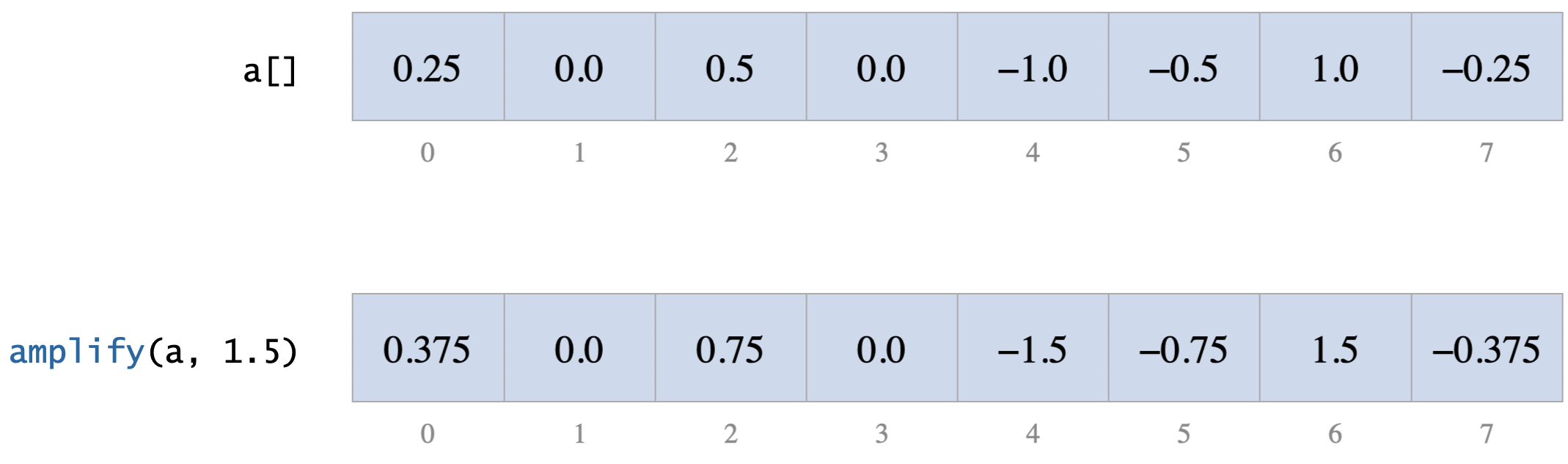
Note:
amplify()may produce samples whose absolute value exceed 1, even if all input samples are between –1 and +1. -
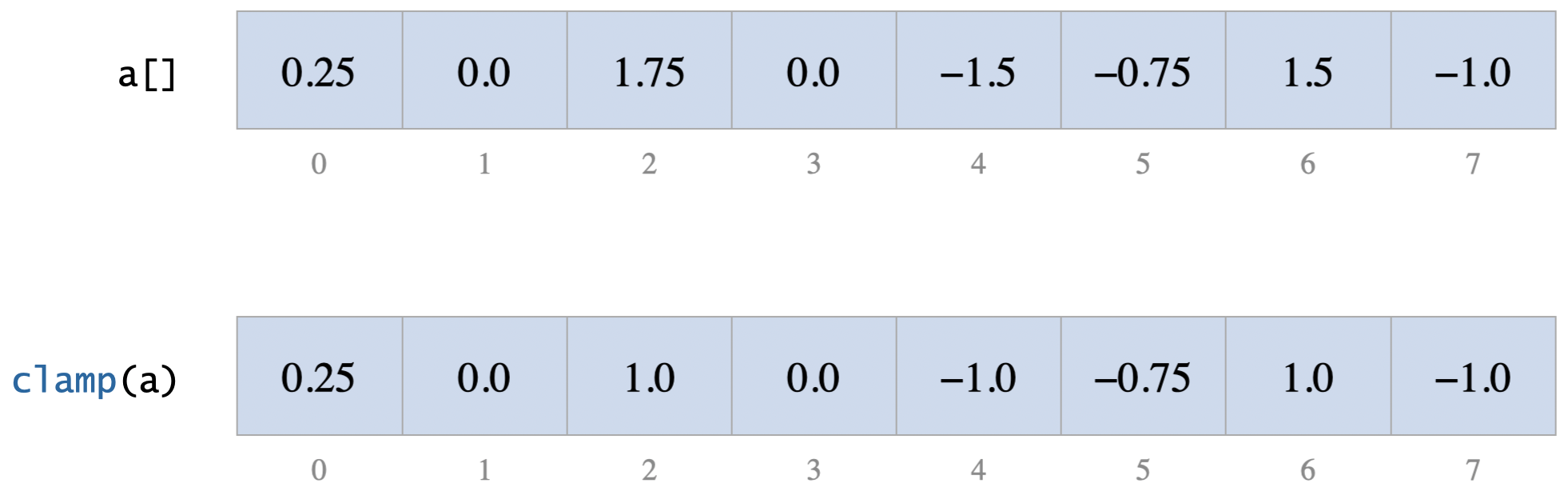
clamp(double[] a)Returns a new array where each sample in
a[]is “clamped” to the range [–1, +1]:- values greater than +1 become +1
- values less than –1 become –1
- values between –1 and +1 are unchanged
For example:
-
reverse(double[] a)Returns a new array with the same samples as
a[], but in reverse order. This can lead to unexpected (and sometimes entertaining) results. For example: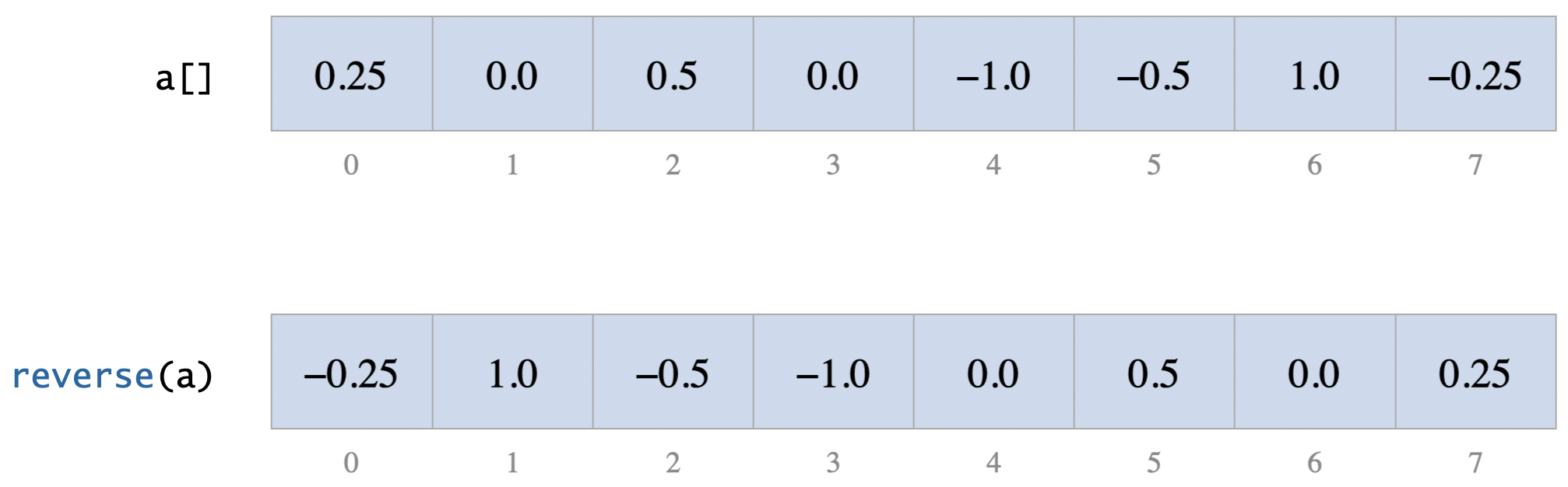
-
merge(double[] a, double[] b)Returns a new array that contains the samples of
a[]followed by the samples ofb[]. If the two sounds have lengths $m$ and $n$, the resulting array has length $m + n$. This enables you to play two sounds sequentially. For example: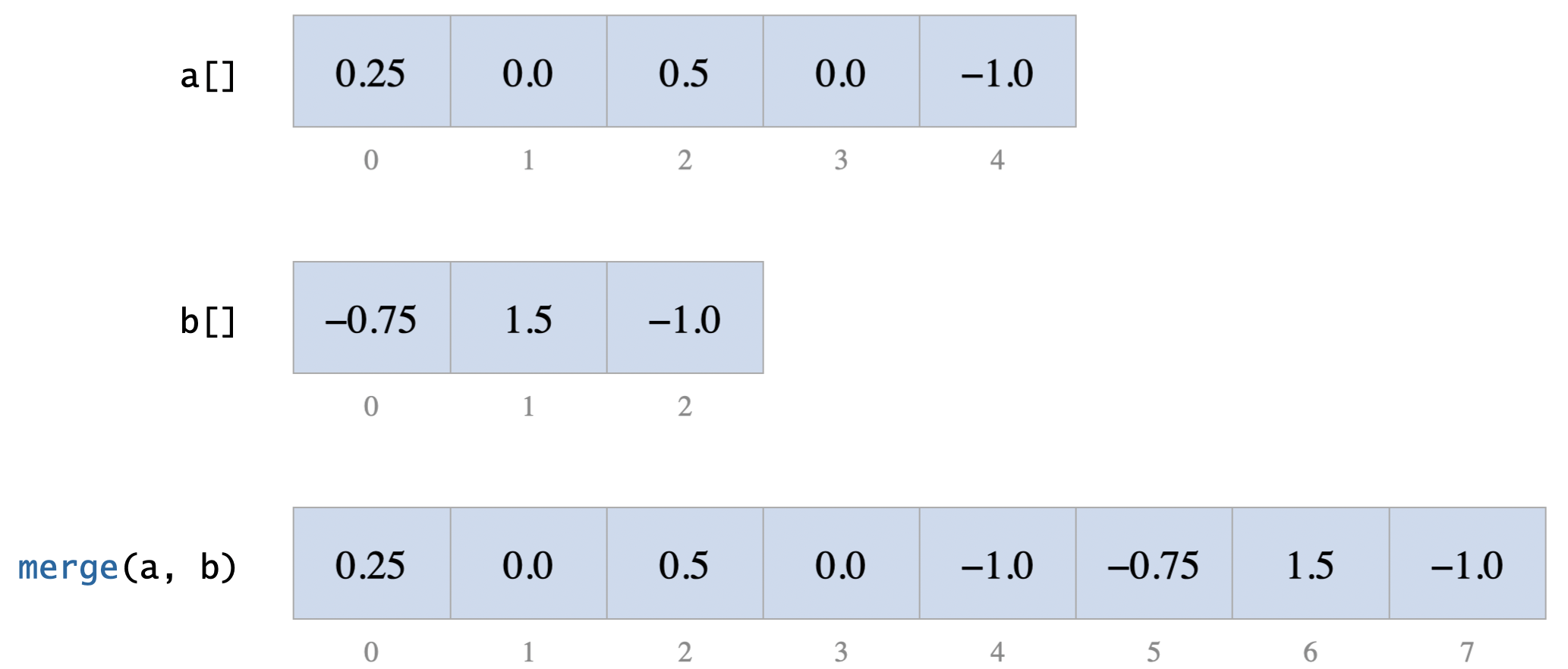
-
mix(double[] a, double[] b)Returns a new array that adds the corresponding samples of
a[]andb[](sample-by-sample). If one array is shorter, treat missing samples as 0. This enables you to play two sounds simultaneously. For example: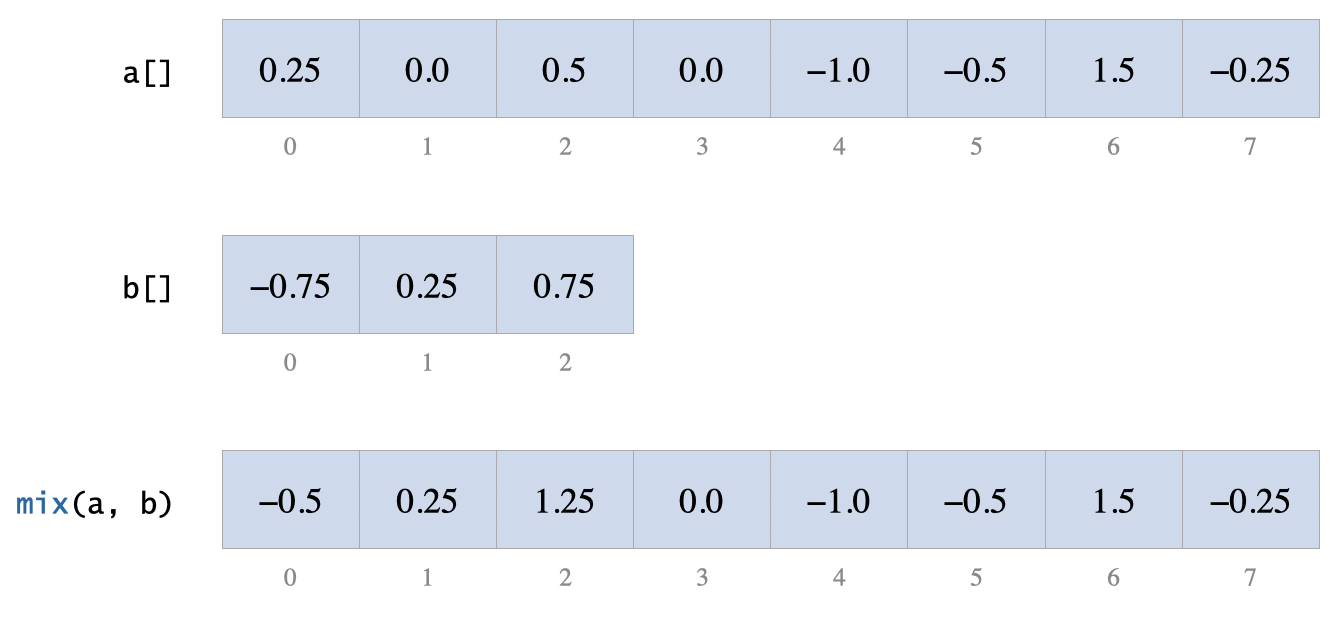
Note:
mix()may produce samples whose absolute value exceed 1, even if all input samples are between –1 and +1. -
changeSpeed(double[] a, double alpha)Returns a new array that changes the duration of
a[]by resampling, using speed factor $\alpha > 0$. The returned array has length $\lfloor n / \alpha \rfloor$, where $n$ is the length ofa[]. Sample $i$ of the returned array has the same value as sample $\lfloor i \alpha \rfloor$ ofa[]. Larger $\alpha$ plays the sound faster (shorter duration); smaller $\alpha$ plays it slower (longer duration). For example: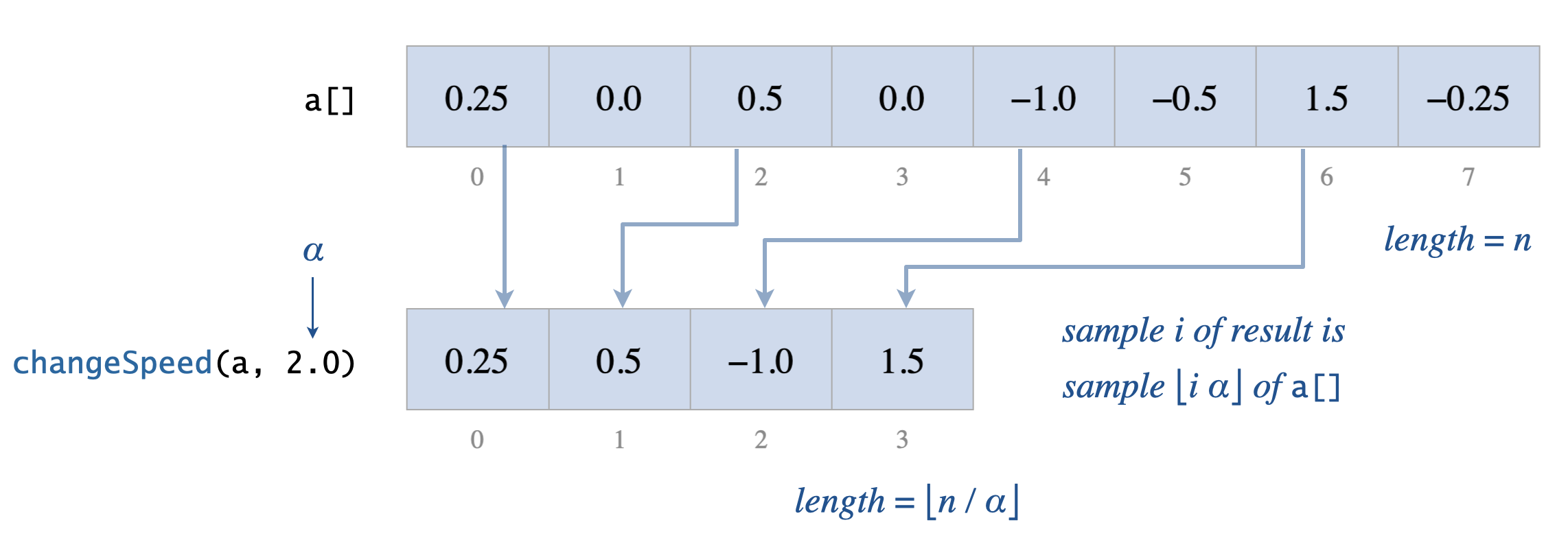
Q.Which does the notation $\lfloor x \rfloor$ mean?
A.It is the floor function: the largest integer less than or equal to $x$.Q.How can I compute $\lfloor x \rfloor$ in Java?
A.Castxto anint, which discards the fractional part (rounds toward 0). Ifxis nonnegative, this equals $\lfloor x \rfloor$.Q.The
changeSpeed()function changes not only the speed of the sound, but also its pitch. Why?A.Resampling changes the playback rate. Speeding up the sound raises the pitch, producing the “chipmunk” effect. More sophisticated time-stretching techniques can change speed without changing pitch. That’s the kind of technique used, for example, when you watch a lecture recording at 2× speed while keeping the speaker’s voice at a natural pitch.
Part II: Audio Collage
Now use your library methods to create an audio collage.
In main(), build a single array of samples that represents your collage,
then play it using StdAudio. Follow these requirements:
- At least 5 WAV files. Use at least five different WAV files. Several are provided, and you may also supply your own.
- Use all audio effects. The collage must use every function from the API: amplify, reverse, merge, mix, change speed, and clamp. You may also add additional effects (see ideas below).
- Duration. The collage must be between 10 and 60 seconds (441,000 to 2,646,000 samples).
- No command-line arguments. Do not use command-line arguments.
- Valid samples. All samples passed to standard audio must be between –1 and +1.
- Be creative. We plan to post your audio collages.
Q.How do I read a WAV file and extract its samples?
Call StdAudio.read(). It returns a double[] containing samples between –1 and +1.
double[] samples1 = StdAudio.read("cow.wav");
Q.How can I convert an audio file to WAV format?
Q.What is a WAV file?
Q.Can intermediate samples be outside the prescribed range?
clamp() on final array.Implementing Other Audio Effects
You may implement additional functions that produce other audio effects.
Any such helper must be private. For example:
private static double[] mirror(double[] samples) {
   ...
}
Some ideas include:
- normalize: rescale a sound so that all samples are between –1 and +1.
- cut: extract a contiguous subarray from a sound.
- trim: remove leading and trailing samples that are 0 (or nearly 0).
- loop: repeat a sound a specified number of times.
- mirror: concatenate a sound with its reverse.
- hip–hop: speed up a sound, mirror it, then loop it.
- echo / delay / reverb: add a time-delayed copy of a sound to itself, attenuated by a scale factor.
- fade-in / fade-out: gradually increase or decrease the volume at the beginning or end of a sound.
- crossfade: fade out the first sound while fading in the second, with an overlap.
- tremolo: create a trembling effect by modulating the amplitude over time.
You may also synthesize your own sounds by generating a sine, square, triangle, or sawtooth wave with a given amplitude, frequency, and duration.
Submission
Upload all files to TigerFile :
AudioCollage.javareadme.txtacknowledgments.txt- Any supplementary WAV files (do not submit the WAV files we provided).
If you submit supplementary WAV files, cite their source in readme.txt.
We may publish selected collages (anonymously) on the course website.
Publishing is optional: if you do not wish your work to be published,
indicate this in readme.txt.
Grading Breakdown
| File | Points |
|---|---|
| AudioCollage.java | 36 |
| readme.txt | 4 |
| Total | 40 |
Credits
-
This assignment was inspired by an audio effects programming assignment by Keith Vertanen.
-
The assignment name is a play on the https://en.wikipedia.org/wiki/Schoolhouse_Rock! title Conjunction Junction.