2. Arrays and Input/Output
Download project ZIP
| Submit to TigerFile
In this assignment, you will write array-based programs that
read input with StdIn,
print results with StdOut,
draw graphics with StdDraw,
play sound using StdAudio.
You will also redirect standard input to read from a file.
Getting Started
- Read Sections 1.4 and 1.5 of the textbook and review the corresponding lectures and precepts.
- Download and unzip arrays.zip
, then open the
arraysproject in IntelliJ. - Take the Getting Help in COS 126 Quiz.
- Consult the Programming Assignments FAQ as needed.
- Refer to the relevant textbook library APIs in the Java Cheatsheet.
- Reminder: You may use only Java features introduced so far.
Dice and the Gaussian Distribution
Write a program DiceHistogram.java that takes two command-line arguments:
$n$ (the number of fair six-sided dice) and $trials$ (the number of trials).
Each trial consists of rolling all $n$ dice, summing the results, and recording the total.
Use an integer array to tabulate how many times each possible total occurs (from $n$ to $6n$)
over all trials. Then print a text histogram of the results.
Print one line per total. Each line contains:
- the total, right justified in a field of width 3,
- a colon,
- one space,
- a sequence of
*characters whose length equals the number of times that total occurred.
Here are a few sample executions. Because the rolls are random, your output may vary. However, when the number of trials is large, the histogram should resemble the examples below.
~/Desktop/arrays> java-introcs DiceHistogram 2 500
  2: **************
  3: ***************************
  4: *********************************
  5: *************************************************************
  6: **********************************************************************
  7: ******************************************************************************
  8: ***********************************************************************
  9: **********************************************************
 10: **********************************************
 11: ****************************
 12: **************

~/Desktop/arrays> java-introcs DiceHistogram 10 1000
 10:
 11:
 12:
 13:
 14:
 15:
 16:
 17:
 18: *
 19: ****
 20:
 21: ***
 22: ******
 23: ********
 24: ****************
 25: *************
 26: **********
 27: *********************************
 28: ****************************************
 29: *********************************
 30: ***************************************************
 31: *****************************************************************
 32: ********************************************************
 33: **************************************************************************************
 34: ***********************************************************
 35: *********************************************************************
 36: ***********************************************************************************
 37: **************************************************************
 38: *****************************************************************
 39: ***************************************
 40: *****************************************************
 41: ************************************
 42: ****************************
 43: ************************
 44: ************************
 45: *********
 46: ***********
 47: *******
 48: ***
 49: **
 50:
 51:
 52: *
 53:
 54:
 55:
 56:
 57:
 58:
 59:
 60:
Context: The central limit theorem, a key result in probability and statistics, asserts that when the number of dice and trials is large, the histogram of the sums approaches the familiar bell curve (Gaussian distribution).
Q.What values should my program handle for n and trials?
Q.How do I print an integer right-justified in a field of width 3?
Use formatted printing. For example,
StdOut.printf("%3d", value);
Q.I have the magic number 6 sprinkled through DiceHistogram.java. Is there a better way?
Yes. Define a named constant and use it throughout. For example:
int SIDES = 6;
Echo Filter
Consider what happens if you superpose a sound file with a delayed copy of itself. You will hear the same sound twice, with the second instance slightly delayed. If the $delay$ is relatively short (say, 15,000 samples or about 1/3 of a second) and you reduce the loudness of the delayed copy by scaling its samples by a $decay$ factor (e.g, multiply by 0.5), the result is an echo effect, similar to what you might hear in a tunnel or large empty room.
Example. Consider the following sound wave:

Here is the same sound wave with $delay = 3$ (shift 3 positions to the right)
and $decay = 0.8$ (multiply by 0.8):

Superposing the two sound waves (adding them element-by-element) results in the following:

Task.
Write a program EchoFilter.java that takes three command-line arguments:
a string filename, an integer delay, and a real-valued decay factor.
It applies an echo filter to the given sound file and plays the resulting sound.
The length of the resulting sound (in samples) is the original length plus the delay.
Here are some sample executions:
~/Desktop/arrays> java-introcs EchoFilter IHaveADream.wav 0 0.0 ~/Desktop/arrays> java-introcs EchoFilter IHaveADream.wav 15000 0.5 ~/Desktop/arrays> java-introcs EchoFilter PearlHarbor.wav 15000 0.5 ~/Desktop/arrays> java-introcs EchoFilter TheHillWeClimb.wav 10000 0.5 ~/Desktop/arrays> java-introcs EchoFilter Crow.wav 10000 0.5 ~/Desktop/arrays> java-introcs EchoFilter HelloWorld.wav 5000 1.0 ~/Desktop/arrays> java-introcs EchoFilter RowYourBoat.wav 117600 1.0
Context: An echo filter is a popular voice effect that you can apply on social media platforms such as TikTok.
Q.Is delay measured in samples?
delay samples after the original sound.Q.Can I assume that delay is a non-negative integer?
Q.Can I assume that decay is between 0 and 1?
decay values between 0 and 1.Q.Is it possible for delay to be longer than the number of samples in the original array?
Q.How do I test my program?
Start with a small example. For example, use decay = 0.8, delay = 3, and
double[] original = { 1.0, 0.0, 0.5, 0.0, -1.0, -0.5, 1.0, 0.25 };
to match the daigram above (and the sound in tiny.wav).
This example is too small to play,
but you can print the resulting array to verify your calculations.
Q.How do I print the contents of an array for debugging?
a[] is an array, System.out.println(a) prints a reference to the array
(not its elements).
To print the elements, use a for loop.Q.How many times should my program call StdAudio.play()?
StdAudio.play() with a double[] array as argument.Q.The echo filter repeats the sound only once. How could I get a repeating, decaying echo?
World Maps
Write a program WorldMap.java that reads boundary data for a country (or other geographic entity)
from standard input (using StdIn) and draws it to standard drawing (using StdDraw).
A country consists of a set of regions (e.g., states or provinces).
Each region is described by a polygon.
Represent a polygon using two floating-point arrays:
one containing the $x$-coordinates and the other containing the $y$-coordinates of the polygon’s vertices.
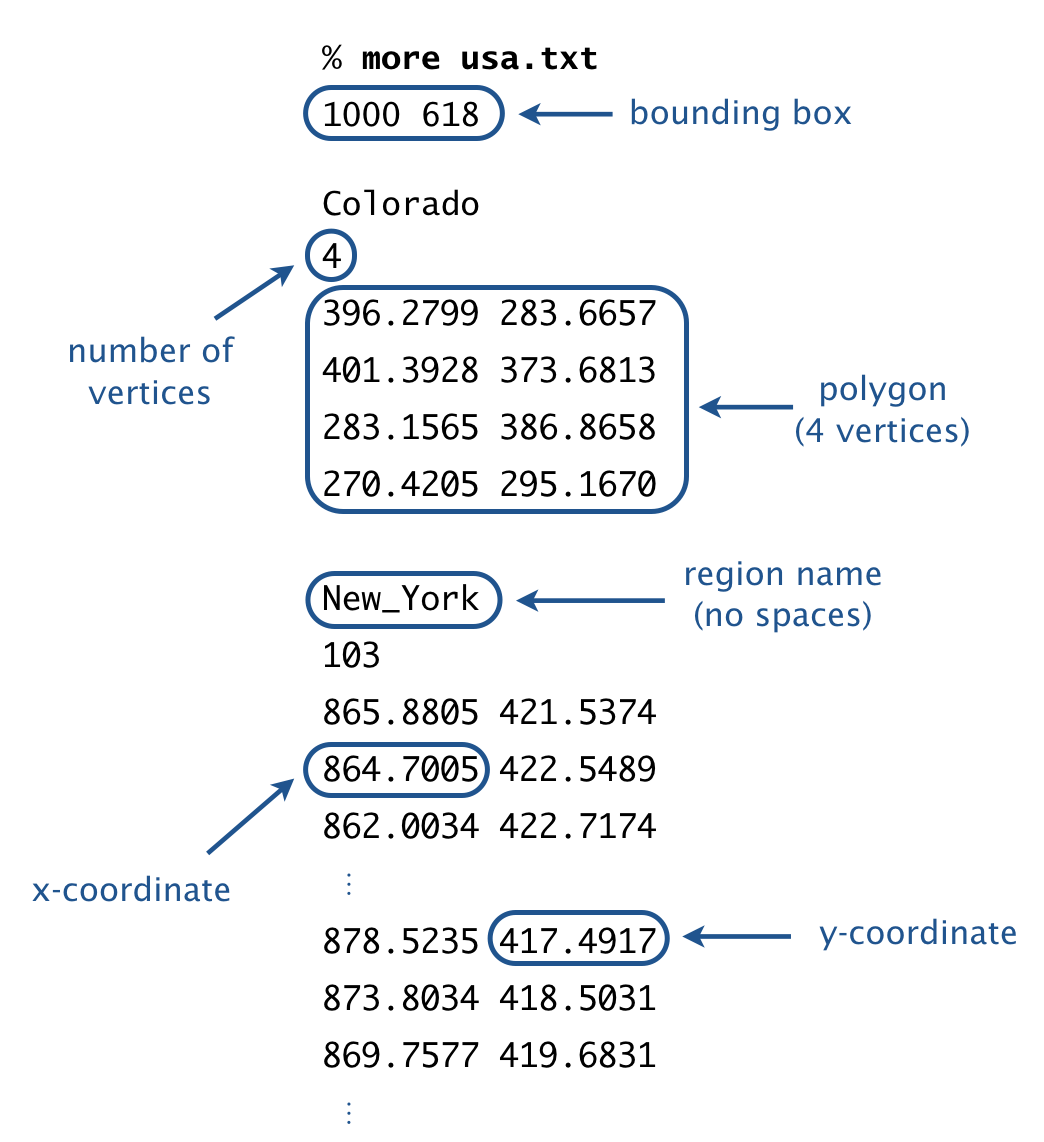
Input format. The first line contains two integers: width and height. The remainder of the input is divided into regions.
- The first token in each region is the region name. For simplicity, names contain no spaces.
- The next token is an integer specifying the number of vertices in the region’s polygon.
- The remaining tokens in the region are the $x$- and $y$-coordinates of the vertices.
Output format. Draw the polygons to standard drawing, using the following guidelines:
-
Call
StdDraw.setCanvasSize()to set the size of the canvas to width-by-height pixels. -
Call
StdDraw.setXscale()andStdDraw.setYscale()so that the $x$-coordinates range from 0 to width and the $y$-coordinates range from 0 to height. -
Call
StdDraw.polygon()to draw each polygon. This method takes two arrays as arguments: the array of $x$-coordinates and the array of $y$-coordinates. It draws the polygon whose vertices are given by those $x$- and $y$-coordinates.
Data files. The project folder includes the following data files:
Here are some sample executions:
~/Desktop/arrays> java-introcs WorldMap < shapes.txt~/Desktop/arrays> java-introcs WorldMap < usa.txt
~/Desktop/arrays> java-introcs WorldMap < iceland.txt
~/Desktop/arrays> java-introcs WorldMap < world.txt

Q.Can I assume the input file is properly formatted?
Q.What if a region has multiple boundary polygons?
Q.Can I draw the boundary of a region as a sequence of line segments instead of a polygon?
StdDraw.polygon(), as specified.Q.My program runs slowly for inputs with a large number of regions. Any way to speed it up?
Yes. By default, as soon as you call a drawing method such as StdDraw.polygon(),
the result appears on screen.
Updating the screen is relatively expensive (in terms of CPU time).
If there are thousands of geometric objects to draw, this can slow down your program considerably.
To avoid this slowdown, use the double-buffering feature of standard draw:
- Call
StdDraw.enableDoubleBuffering()once before any drawing code. Now all drawing is done on an offscreen canvas. - Call the drawing commands such as
StdDraw.polygon(). Nothing will appear on screen yet. - Call
StdDraw.show(). This transfers the offscreen canvas to the onscreen canvas.
You can think of double buffering as collecting all drawing commands and then displaying them all at once.
Q.My favorite country is not supplied as one of the data files. Why not?
Q.The displayed map distorts the areas of regions. How can I fix this?
Submission
Upload all required files to TigerFile :
DiceHistogram.javaEchoFilter.javaWorldMap.javareadme.txtacknowledgments.txt
Grading Breakdown
| Files | Points |
|---|---|
| DiceHistogram.java | 12 |
| EchoFilter.java | 12 |
| WorldMap.java | 12 |
| readme.txt | 2 |
| Getting Help Quiz | 2 |
| Total | 40 |
This assignment was developed by Kevin Wayne. Copyright © 2022–2026.