
JuleCTF 2025 C# Challenges Writeup
JuleCTF is a CTF advent calendar run by the Norwegian national cybersecurity competition (Cyberlandslaget) organizers every December. I believe they started the tradition last year. I wasn’t able to participate then, so I’m happy I got to make some time this year. I managed to solve all the normal problems and 2 out of the 3 bonus problems before Christmas. I really enjoyed it; thanks to the organizers for a fun and varied event!
Two of the challenges I liked were about C# / .NET:
- Luke 13 (Bonus) - Nisselandslaget
- Luke 23 - Cookie clicker
Luke 13 (Bonus) - Nisselandslaget
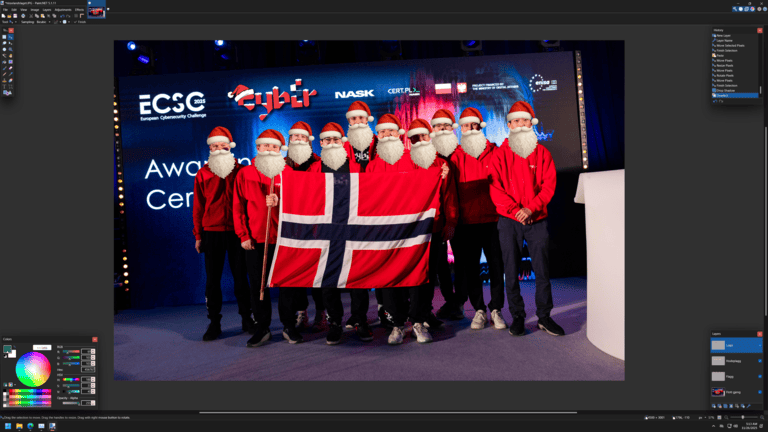
The given desktop screenshot
In this challenge we were given a memory dump of the photo editing software Paint.NET right before it apparently crashed. In addition, we are given a desktop screenshot (above) showing that the user was editing a file with four layers, one of them called “Flagg”. Seems like we need to recover the image data corresponding to this layer from the memory dump.
(Quick aside, I found out that you can make a memory dump of any Windows process through the Task Manager. Could be useful in the future!)
After searching around and trying a few different tools, I eventually came across dotnet-dump and WinDbg. We loaded the dump in dotnet-dump with
> dotnet-dump.exe analyze paintdotnet.DMP
Commands that I tried included :
dumpstackobjects/dsodumpheapdumpobj/do
Guessing that the object we are looking for should have Layer or something similar in the class name, I ran this command to list all objects matching this description and the following line caught my eye.
> dumpheap -type Layer -stat
(...)
7ffb4a93f1f0     4       352 PaintDotNet.BitmapLayer
(...)
The four indicates that there are 4 of these objects on the heap, which would correspond to the 4 layers we expect. Running the following command to list all these PaintDotNet.BitmapLayer objects using its method table (MT) identifier:
> dumpheap -mt 7ffb4a93f1f0
         Address               MT           Size
    019edb252dd8     7ffb4a93f1f0             88
    019edb266760     7ffb4a93f1f0             88
    019edb32a500     7ffb4a93f1f0             88
    019edd9c4298     7ffb4a93f1f0             88

Statistics:
          MT Count TotalSize Class Name
7ffb4a93f1f0     4       352 PaintDotNet.BitmapLayer
Total 4 objects, 352 bytes
Inspecting one of these, we get a list of its properties and a few of them stand out:
> do 019edb252dd8
Name:        PaintDotNet.BitmapLayer
MethodTable: 00007ffb4a93f1f0
(...)
Fields:
              MT    Field   Offset                 Type VT     Attr            Value Name
00007ffb49462f78  4000035       3c       System.Boolean  1 instance                0 isDisposed
00007ffb49467408  4000036       30         System.Int32  1 instance             4500 width
00007ffb49467408  4000037       34         System.Int32  1 instance             3001 height
00007ffb4aa20ce8  4000038        8 ...r+LayerProperties  0 instance 0000019edb535868 properties
(...)
00007ffb4aa1ea10  4000008       48  PaintDotNet.Surface  0 instance 0000019edb252e68 surface
Looking good! The width and height values match what we expect from the included screenshot (4500 x 3001). Inspecting properties we confirm that this object has properties.name = "Flott gjeng" which is the name of one of the layers. We go through the 4 Layer objects until we find the one corresponding to the flag layer (at 019edb32a500).
From there we inspect the surface attribute, and find another attribute called data. Dumping this object fails with <Note: this object has an invalid CLASS field> Invalid object. However, there is another attribute called scan with the promising type PaintDotNet.MemoryBlock so we inspect it:
> do 0000019edb32a598
Name:        PaintDotNet.MemoryBlock
MethodTable: 00007ffb4aa21ae8
(...)
Fields:
              MT    Field   Offset                 Type VT     Attr            Value Name
00007ffb49494460  4000051       18         System.Int64  1 instance         54018000 length
00007ffb494b72e8  4000052       20                  PTR  0 instance 0000019e9aa80000 voidStar
Paint.NET is likely to keep images in memory as raw bitmaps. One such format is RGB888, where each pixel corresponds to 24 bits: 8 for red, 8 for green, and 8 for blue in that order. Let’s see whether the length of this memory block makes sense with this in mind: 4500 * 3001 * 3 bytes = 40513500. This doesn’t quite match - perhaps it is RGBA8888? 4500 * 3001 * 4 bytes = 54018000. Bingo!
Now we can extract this many bytes from the memory location at voidStar = 0000019e9aa80000. As far as I know, dotnet-dump doesn’t have any memory extraction capabilities, so I used WinDbg instead. WinDbg wasn’t such a great experience (the non-Legacy version would claim to extract the bytes I wanted but did not), but eventually did the job. The command I used was
> .writemem c:/temp/image.data 019e9aa80000 L?0x3383FD0
After opening the extracted data file in Gimp (choosing RGBA 8-bit as the pixel format and setting the correct image size), we have the flag!

JUL{fotogeniske_alver}
All in all, great and educational forensics challenge! Might even come useful someday to recover unsaved files.
Luke 23 - Cookie clicker

Cute cookie!
In this challenge we are directed to a simple cookie clicker game. Apparently if we click 1000000000 times we get a flag. With all web challenges, I began by reading the source code. The challenge description had mentioned a super fast WebAssembly backed framework which we find out is Blazor.
Blazor is a framework allowing you to run .NET on the web, client side. The entire .NET runtime is provided in WebAssembly and it runs your C# code. Since this is all client side, it makes sense to find the C# code and extract the flag. Pretty straightforward, right?
It should have been, but it took me some time to find the necessary file called chall.wasm (this is a WebAssembly file that includes the C# in WebCIL format and some WebAssembly plumbing to run this C# with the .NET runtime included from another WebAssembly file). I hoped to use the DevTools network tab to see a request for chall.wasm but it didn’t show up. I did an “Empty Cache and Hard Reload” and still nothing.
Eventually I checked out the Application tab in DevTools and finally could see it under Cache storage. Cache storage is different from the traditional web cache (which is what I was clearing). In summary, the Cache API gives developers precise control over what resources should be in cache and is used for offline web apps and PWAs, among others. In particular, web cache data is only cleared when a user deletes the site data for that particular site, and not just the cache data (like I was doing).
Good to know. I cleared out the Cache storage and finally chall.wasm showed up on the Network tab. I downloaded the file I used ILSpy (a .NET Decompiler) to convert the WebAsseembly packed WebCIL .NET code back into human readable .NET. The relevant part is pasted below:
private string DecryptFlag(double key)
	{
		byte[] array = Convert.FromBase64String(new string(("=kc86vOFEczPvg1R3ZGbcaYtlqq2cev5vzRDhJCBfl0dlVpyJWL" + "pRvdn4L+EU9QPmMAQP9HZUO4i8m62CDf+pbxB1ojKMckd+tDmCe" + "L9vm9x4Du4awAN21iXJZ3ZWyp31aa0d/M+lLxHI0DJTdUTuUGkF" + "qdusWdwPnf6FJAZ/kyVFVnKpRJhzu7rYTs8jneHHQWIigVT3FDb").Reverse().ToArray()));
		byte[] array2 = new byte[array.Length];
		for (int i = 0; i < array.Length; i++)
		{
			byte b = (byte)((0x5A ^ ((i * 13) & 0xFF)) & 0xFF);
			array2[i] = (byte)(array[i] ^ b);
		}
		string hex = Encoding.ASCII.GetString(array2);
		byte[] source = (from num in Enumerable.Range(0, hex.Length / 2)
			select Convert.ToByte(hex.Substring(num * 2, 2), 16)).ToArray();
		int xorKey = (int)(key % 123.0);
		return new string(source.Select((byte b2) => (char)(b2 ^ xorKey)).ToArray());
	}
Reading another section of the code, we find that key = 1000000000 and we run the code to recover the flag!
JUL{w3bc1l_1s_just_4_wr4pp3r_f0r_dlls_4nd_d3c0mp1l1ng_th3m_1s_n0t_d1ff1cult}
Cool challenge! I went down a WebAssembly rabbit hole afterwards and realized I forgot just how complex and capable web technologies have become recently. Can you imagine that we can run the entire .NET runtime in a browser tab now? Also, from now on, I’ll keep in mind that all kinds of Web APIs exist for storing data client side (Cache API, IndexedDB, Web Storage API, Cookie Store API), so I don’t struggle to find client resources again.
Closing
Wow, you made it to the end! Thanks for reading and happy new year!