Programming Assignment 1: Progressive Meshes
Due Tuesday, Oct. 10
Overview
For this assignment, you will implement a mesh simplification system
based on the techniques described by Hoppe 96
and Garland 97. Your program must
be able to perform a series of simplifications based on the edge
collapse operation, then reconstruct a mesh at any desired level of detail
via vertex splits.
0. Starter code
Download the starter code as a zip file
or as a gzipped tar file and get it to compile
(type make). You'll need to install a GLUT library, as well, to get
the offviewer program to work -- if your computer does not already have
GLUT, you can download and install the freeglut library from
http://freeglut.sourceforge.net/
Now, download a few sample meshes
(in ".off" format, documented
here)
and start the provided offviewer on one of them. The model file should be
provided on the command line or, under some systems, you might be able to
drag 'n drop the model file on the executable.
The mouse/key functions are as follows:
- Left mouse button: rotate
- Middle mouse button (or left and right held together): scale
- Right mouse button: translate
- 'f' key: toggle drawing mesh faces
- 'e' key: toggle drawing mesh edges
- 'v' key: toggle drawing mesh vertices
- 'q' or 'Esc' key: quit
If you have existing mesh viewing code, feel free to use that instead.
1. Mesh Decimation (60%)
- Write code to build up a mesh connectivity data structure of your choice.
Use it to write an "Edge Collapse" function. A single edge collapse should
take O(1) time (or, at worst, O(d), where d is the maximum
degree of the vertices being collapsed). Be sure to make your data structure
robust for non-manifolds.
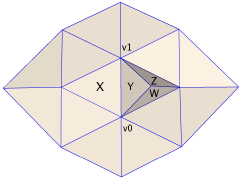 When you collapse an edge, be sure to remove any degenerate faces that are
produced. For example, in the example at right (available as
testpatch.off), collapsing
the edge between v0 and v1 will cause faces X and Y
to be degenerate (i.e., have two vertices that are really the same point).
In addition, you should remove any "fins" (pairs of mirror-image polygons)
produced by the collapse. In this example, you should remove faces
Z and W.
When you collapse an edge, be sure to remove any degenerate faces that are
produced. For example, in the example at right (available as
testpatch.off), collapsing
the edge between v0 and v1 will cause faces X and Y
to be degenerate (i.e., have two vertices that are really the same point).
In addition, you should remove any "fins" (pairs of mirror-image polygons)
produced by the collapse. In this example, you should remove faces
Z and W.
- Write code to compute the quadric error metric for a candidate edge
collapse. Use it to create a priority queue of edge collapses, and apply
them in order until the mesh can't be simplified any more. The
Garland 97 paper and Diego Nehab's
notes
on quadric error metrics may be useful. The sample code in
apps/heaptest might be useful if you want to use the heap library
provided.
- Adapt your code to place the vertex resulting from an edge collapse at
the location that minimizes the error quadric.
2. Progressive Meshes (20%)
- Store data about the edge collapses in a data structure of your choice.
The Hoppe 96 paper may be a useful reference.
- Adapt the viewer to include an interactive control over the resolution
of the displayed mesh. This doesn't have to be fancy - a simple keyboard
control where 'up arrow' and 'down arrow' increase/decrease polygon count by
10% is fine.
3. Bells 'n whistles (10%)
Implement one of the following (additional options may be implemented for
additional credit).
- Write out the edge collapses to a file, in a format of your choosing,
then adapt your viewer to read just the base mesh and edge collapses,
instead of the original mesh.
- Implement a visualization of the error quadrics as ellipsoids
- Implement geomorphs for smooth transitions between levels of detail.
- Augment your system to perform "pair collapses" in addition to simple
edge collapses. Experiment with models with many separate components and
show that your program joins them into one over the course of simplification.
- Experiment with different error metrics. For example, implement a
system that tries to preserve high-frequency detail at the expense of
greater low-frequency deformation in areas with less detail.
- Implement a view-dependent progressive mesh viewer based on
Hoppe 97. (Big time extra credit for this one!)
4. Writeup and analysis (10%)
Please submit your source code together with a writeup (as plain text,
HTML, or PDF) that contains a description of the design decisions you made,
options you implemented, and results. At a minimum, you should include
a screenshot of the bunny model
(from here) decimated to 500 faces,
together with information about how long it took to simplify.
Models
There is a small collection of models suitable for this project here.
There is also a large database
of models here, although many of the models will have a small number of faces
and/or disconnected components and therefore be poor for this project.
Hints
- The choice of mesh data structure is critical - think through your
algorithms before settling on a final choice. An indexed face set plus
a vertex-to-face adjacency list can lead to relatively simple, though
perhaps slightly inefficient, algorithms, while winged-edge or half-edge,
despite their greater efficiency, can lead to complex algorithms
with lots of special cases, especially since you need to reject edge collapses
that would result in non-manifold topology.
- Take advantage of the STL container classes and GAPs support packages - depending
on your needs, using a vector, list, set,
priority_queue, or pair from the STL might make your life
easier. Alternatively, RNArray and RNHeap classes of the RNBasics package
with GAPS might be useful. Simple geometric operations involving points,
planes, distances, etc.are supported by the R3Shapes package within GAPS.
- Keep in mind the cost of performing each operation on each data structure
(e.g., insert and erase are O(n) for a
vector, but push_back and pop_back are amortized
constant time). Note that the cost of removing an entry from an RNArray
is linear in the size of the array.
Submitting
Please make your writeup and code accessible via the web, and send the URL
to funk@princeton.edu with "COS526" in the subject line. Please
see the general notes on submitting
your assignments, as well as the
late policy and the
collaboration policy.